
What if the biggest opportunity in automating business processes with custom software isn’t eliminating a task, but fixing the handoff that keeps work stuck? When employees coordinate updates across spreadsheets, email, and disconnected systems, adding another tool can move the friction without solving it.
That frustration is familiar to business owners and executives: repetitive follow-ups consume time, while important information stays scattered. A tailored workflow can connect the systems people already use and make the next step clearer. A custom build makes sense when the process, its users, and the expected operational outcome are well understood.
This practical case study shows how to identify a recurring bottleneck, map the workflow around it, and shape a focused software solution. It also explains how to assess results using operational measures, such as time spent coordinating, delays between handoffs, and errors that require rework. The approach applies to teams in Dallas, Fort Worth, Plano, Frisco, and Irving, as well as businesses elsewhere in Texas and across the country.
Key Takeaways
- Start with a recurring bottleneck, and simplify the process before automating it.
- Turn workflow discovery into clear rules, shared records, and connected systems that reduce manual coordination.
- Choose between process redesign, existing tools, integrations, or automating business processes with custom software based on the workflow’s needs.
- Use an illustrative multi-step handoff to see how requests can move from intake through review and fulfillment with clearer ownership.
- Measure operational changes and align business goals, user needs, and technical scope before implementation.
When does automating a business process with custom software make sense?
Automating a process means using software to handle repeatable steps, route work to the right person, maintain records, and send notifications with less manual coordination. For example, software might capture a request once, assign it to an owner, record its status, and prompt the next action. The aim of Business Process Automation is to make work flow more consistently, not to add technology for its own sake.
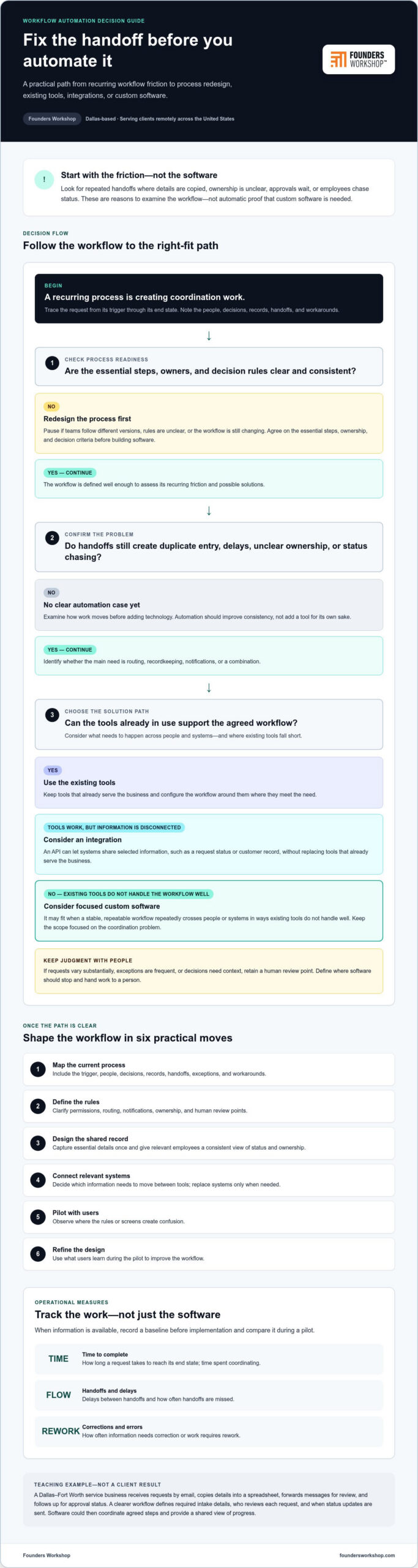
Look closely at handoffs. Employees may enter the same information in multiple spreadsheets, email may leave ownership unclear, approvals may sit without a visible next step, or staff may spend time chasing updates. These are signs to examine the workflow, not automatic proof that custom software is needed. First determine whether the process is clear and consistent enough to support.
Teaching example, not a client result: A Dallas-Fort Worth service business receives customer requests by email. Staff copy details into a spreadsheet, forward messages for review, and follow up to learn whether a request was approved. A clearer process could specify required intake details, who reviews each request, and when status updates are sent. Once the rules and responsibilities are agreed, software could coordinate those steps and give the team a shared view of progress.
Which business processes are strong automation candidates?
Start with workflows that happen often, have a clear trigger, follow predictable steps, and have identifiable owners. Intake, approvals, document routing, status updates, and service handoffs can be strong candidates when the same core rules apply each time. Map the steps and note where information is entered, decisions are made, or work waits. This helps identify whether the main need is routing, recordkeeping, notifications, or a combination.
Not every step should happen without a person. If requests vary substantially or require context and judgment, retain a human review point. Good workflow design makes routine handling more consistent while giving employees a clear way to manage exceptions.
When should a business avoid automating a process?
Pause if employees follow different versions of the process, decision rules are unclear, or the workflow is still changing. Automating those conditions can make inconsistent practices move faster without making them better. First agree on the essential steps, ownership, and decision criteria. The right first move may be process redesign rather than software development.
Then consider exceptions. If unusual cases are frequent or require nuanced judgment, define where the software should stop and hand the work to a person. Custom software is most useful when a stable workflow repeatedly crosses people or systems in ways existing tools don’t handle well. A focused scope can automate predictable coordination while preserving human oversight where it matters.
How custom software turns a manual workflow into a connected process
Workflow automation is software coordinating repeatable steps so people can focus on decisions that need their judgment. That starts with understanding the work, not choosing a technology. As IBM explains in its overview of Business Process Automation, automation can support business operations by handling process tasks through software.
A practical sequence is to map the current workflow, define its rules, design the software, connect relevant systems, pilot the solution, and refine it based on what users learn. Each stage answers a specific question: Where does work begin? Who owns each step? What information or decision moves it forward? Which systems need to share that information?
Map the current process before writing software requirements
Trace a request from its trigger to its end state. Record the people involved, decisions made, records created, and handoffs between teams. Include exceptions and workarounds, not just the ideal path. If staff maintain a separate spreadsheet because the official system lacks a needed status, that workaround is part of the process to understand.
When the information is available, establish a baseline before implementation. Useful measures include the time a request takes to complete, how often information needs correction, and how many handoffs are missed. These observations help clarify what the software should address and provide a point of comparison during a pilot.
Design rules, integrations, and human review together
Translate the agreed process into clear permissions, routing rules, and notifications. A structured form can collect the same essential details at intake, while a shared record gives relevant employees a consistent view of ownership and status. This can reduce duplicate entry and uncertainty without requiring everyone to search through email threads.
Next, identify where existing systems need to exchange information. An API, or application programming interface, can let systems share selected data, such as a request status or customer record. The goal isn’t necessarily to replace tools that already serve the business. For a Dallas-area company, a focused internal application might coordinate a handoff while connecting with an existing CRM or ERP system.
Keep human review visible for judgment-heavy decisions and unusual cases. Then pilot the workflow with users, observe where the rules or screens create confusion, and refine the design. A disciplined approach to automating business processes with custom software connects technology choices to the handoffs employees actually manage, rather than automating steps in isolation.
Custom software, existing tools, or integrations: which automation path fits?
Repetitive work doesn’t automatically call for a custom application. The right approach depends on where the friction comes from: an unnecessarily complicated process, a gap in how current software is configured, disconnected systems, or a workflow that existing tools can’t support cleanly.
Decision rule: Simplify a process when its steps are the problem, configure existing tools when their features fit, integrate systems when information gets stuck between them, and consider custom software when a distinct workflow needs coordinated rules across roles or systems.
To choose, assess four factors: how unique the workflow is, how complex its rules are, where its system boundaries sit, and what control the business needs over its data. These factors help narrow the solution without assuming that automating business processes with custom software is always the best answer.
When can existing software or process changes be enough?
Sometimes the bottleneck comes from extra approvals, unclear ownership, or duplicate steps. Redesigning the process may resolve it without new software. If the workflow is sound but a current system’s settings aren’t aligned with the work, configuring that system may be enough. A narrow integration can also bridge a specific gap, such as passing a status or record between systems, while leaving core tools in place.
When can a custom workflow application provide a better fit?
A tailored application may fit when several roles and systems must follow distinct rules that existing tools don’t support as one coherent process. It can give teams a shared record, show clear status, and apply role-based access so people see the information and actions relevant to their responsibilities. The case is strongest when those capabilities address a defined operational outcome, not simply a desire for more features.
The paths can also work together. A business might first remove an unnecessary handoff, then connect its remaining systems, and build a focused application only for the workflow those steps still don’t handle. That staged approach keeps the scope tied to the actual business need.
Before choosing, describe the problem in operational terms: where work waits, what information is hard to find, which decisions need consistent rules, and which systems are involved. Then match the solution to the gap. If the process is still changing or depends heavily on case-by-case judgment, clarify the process first. If the workflow is stable but spans systems, integration may be central. If it has distinct rules, multiple roles, and shared data needs, custom internal software may provide a better foundation.
Illustrative case study: automating a multi-step business handoff
Illustrative scenario only: This example describes a hypothetical Dallas-Fort Worth service business. It isn’t a Founders Workshop client result. The purpose is to show how a team could examine a handoff and test a focused workflow without assuming the outcome in advance.
The starting point: scattered requests and unclear ownership
For this example, assume requests arrive through several channels, such as email and phone calls. An employee records each request, another reviews it, a manager approves it, and a fulfillment team completes the work. The baseline process map might look like this:
- Intake: A staff member captures request details, perhaps entering information already recorded elsewhere.
- Review: A reviewer checks the request, but ownership or next steps may not be visible to everyone involved.
- Approval: A manager makes a decision, while the request’s status may remain unclear during the handoff.
- Fulfillment: The team receives the approved request and completes it, potentially following up for missing information.
These are teaching assumptions, not measured facts. Before development, discovery would establish which channels are actually used, what information is needed, who owns each decision, how exceptions are handled, and where records should live. The team would also define what counts as completion and identify which existing tools need to participate.
The proposed workflow: shared records, rules, and measured learning
A focused pilot could test one structured intake record that moves through assigned review, approval, and fulfillment stages. The workflow might notify the next owner when action is needed or connect with an existing business system to share selected request information. Those design choices depend on the workflow and systems involved; they aren’t assumed features or client implementation details.
Before the pilot, document available baseline measures, such as time from intake to completion, repeated data entry, requests returned for missing information, or handoffs without a clear owner. During and after the pilot, observe the same indicators and gather feedback from employees using the workflow. Compare like with like, and report only what the records support. If a measure wasn’t tracked before the pilot, don’t present it as a proven improvement.
This is a practical way to evaluate automating business processes with custom software: start with a defined handoff, test the workflow with real users, and use documented observations to decide what to refine or expand. Founders Workshop’s software development work begins with understanding the workflow and the business need.
How Founders Workshop can help Dallas-area teams automate business processes
Effective automation starts with business alignment, not a list of features. Before implementation, understand the workflow alongside the goals it should support, the people who use it, and the systems it touches. That discovery helps define a practical scope and keeps a software project focused on the operational friction it is meant to address.
From operational bottleneck to software scope
Founders Workshop works with business stakeholders and users to examine how a process runs today: where work begins, who owns each handoff, what decisions shape the next step, and where information is difficult to track. From there, requirements can be defined and prioritized into a focused first release rather than an oversized collection of features.
Human-centered design keeps both employee experience and business objectives in view. A workflow should make responsibilities and next steps clear for the people doing the work, while giving owners a useful view of how the process is operating. If existing systems need to share information, integration decisions follow the workflow requirements. The goal is to connect the tools that matter to the process, not add connections without a defined purpose.
Founders Workshop provides custom internal software, system integrations, and project-based software development. Depending on the need, a solution may focus on a tailored workflow application, connecting systems around an existing process, or combining both. For teams considering automating business processes with custom software, the scope should follow the operational need and intended outcome.
Plan the next step without overbuilding
Bring one recurring process to the initial discussion. A simple description of its current handoffs, the people involved, and where coordination gets difficult is a useful starting point. If you have baseline information, such as completion time, rework, or missed handoffs, bring that too. Agreeing on a desired operational outcome helps the team assess progress and prioritize what belongs in an initial release.
Founders Workshop is based in Dallas and works remotely with businesses across the United States. Whether your team is in Dallas, Fort Worth, Plano, Frisco, Irving, elsewhere in Texas, or another part of the country, start with the process itself and the business result you want to support.
Contact Founders Workshop to discuss your process and request a consultation.
Turn a recurring bottleneck into a clearer workflow
Effective automation starts with a process people understand. Map the handoffs, clarify ownership, and identify what information needs to move. Then choose the right path: simplify the process, configure existing tools, connect systems, or build a focused application when the workflow calls for it.
Automating business processes with custom software is most useful when it addresses a defined operational need, not when technology is added for its own sake. A structured pilot and practical measures, such as completion time, rework, or missed handoffs, can help your team evaluate what’s working and what needs refinement.
For Dallas-Fort Worth founders and business leaders, Founders Workshop brings a Dallas-based team and leadership experience in aligning technical execution with business growth. The team works remotely with businesses across the United States and develops custom internal software and system integrations around real workflows and business goals.
Start with one recurring process and the handoffs that make it harder than it needs to be. Contact Founders Workshop for a consultation.
Frequently Asked Questions
What is business process automation with custom software?
Business process automation with custom software uses an application designed around a business’s workflow to handle repeatable steps, route information, and make work status easier to track. It may connect existing systems or provide a focused internal application. The goal is a defined operational outcome, such as clearer ownership during a handoff, not automating every task. People should remain involved where judgment, exception handling, or context is important.
Which business processes should be automated first?
Start with a frequent process that has clear triggers, owners, rules, and outcomes. Repeated data entry, routine approvals, and predictable handoffs may be useful candidates. Before selecting software, map exceptions, workarounds, and the information people need at each step. If the process is inconsistent or still changing, clarify and simplify it first. Automating unclear rules can make the underlying problem harder to see and manage.
When should a business choose custom software instead of off-the-shelf tools?
Consider custom software when distinct workflow rules, multiple roles, or system coordination create needs that current tools don’t handle well. It isn’t automatically the right choice for every repetitive task. Compare process changes, configuring existing software, integrating systems, and building a tailored application against the outcome you need. For businesses in Dallas-Fort Worth and beyond, Founders Workshop’s Dallas-based team works remotely with clients across the United States.
How does custom software automate a business workflow?
It starts by mapping the existing process, including its triggers, handoffs, decisions, records, and exceptions. Those findings shape requirements for forms, routing rules, permissions, notifications, and system connections. The workflow is then developed and tested with users, often through a focused pilot. Before launch, choose measures tied to the process so the business can compare later observations with a baseline and assess whether the workflow works as intended.
Can custom software integrate with a company’s existing systems?
Yes. Custom software can exchange information with relevant existing systems when the technical interfaces and business requirements support it. Planning should establish which records need to move, which system is responsible for each record, and how errors or exceptions will be handled. The purpose is to support a connected workflow while retaining tools that still serve the organization, not to replace systems without a clear operational reason.
How can a business measure whether process automation is working?
Establish a baseline and select measures that reflect the workflow, such as completion time, rework, missed handoffs, or manual follow-up. Decide how each measure will be collected and who will review it. After a pilot, compare observations with the baseline and account for changes in workload or process scope. If a measure wasn’t tracked before implementation, don’t describe it as a verified improvement.
Does automating a business process eliminate the need for employee review?
No. Software can handle repeatable routing and administrative steps, but employees may still need to review exceptions, make judgment-based decisions, or resolve incomplete information. Build clear escalation points and ownership into the workflow so people know when to step in. A well-scoped system can make responsibilities and status easier to follow while preserving human oversight for decisions that require experience or context.
Ready to discuss a process your team wants to improve? Contact Founders Workshop for a consultation.