
What if the system that feels safest to keep is quietly increasing business continuity risk? Deciding when to sunset a legacy system isn’t about age or chasing newer technology. It’s about whether the system still earns its place when you weigh its business value against security exposure, fragile integrations, and the effort required to keep it running.
If ownership is unclear and maintenance keeps taking time, it may be time to consider a change. But replacement or shutdown can disrupt essential workflows, especially when data flows and dependencies aren’t fully understood. Weigh both sides: the cost and risk of staying put, and the operational risk of changing course.
This guide offers a practical framework for choosing among continued operation, targeted modernization, replacement, and retirement. You’ll learn how to assess business value, operating effort, risk, and less-visible dependencies, then plan a controlled transition that protects critical workflows and information.
For business leaders in Dallas, Fort Worth, Plano, Frisco, Irving, and across Texas, Founders Workshop’s Dallas-based team brings product strategy and technical architecture together to align transition decisions with business goals.
Key Takeaways
- System age alone doesn’t justify retirement. Look for business signals such as recurring operational friction and declining value.
- To decide when to sunset a legacy system, compare its business value, reliability, operating effort, and transition exposure using your organization’s own evidence.
- Match the path to the system’s role: retain it, improve it, modernize it, replace it, or retire it.
- Assign clear business, technical, and data owners to decisions and risks before approving a transition.
- Turn assessment findings into a scoped plan that protects essential workflows, information, and continuity.
When should you sunset a legacy system? Start with the business signals
Age alone doesn’t mean a system should be retired. A long-running application may still support essential work reliably, while a newer one may already create costly friction. To decide when to sunset a legacy system, look at its current business role, the effort required to operate it, and the risks of keeping or changing it.
A sunset decision is a business choice about whether a system should continue to be used and supported, based on its value, risks, and role in future operations. Support status, security exposure, and fragile integrations should inform that choice, but none is an automatic verdict. Software nearing or past its support end date deserves a careful review of its exposure and available safeguards. The decision still depends on what the system does, what relies on it, and whether there’s a sustainable path forward.
Application retirement is one possible outcome, not a synonym for deleting data. Application retirement, also known as application sunsetting, involves shutting down obsolete business applications while retaining access to historical data. The aim is to determine whether continued operation serves the business better than improvement, replacement, or planned retirement.
Which business signals suggest a system has reached its limit?
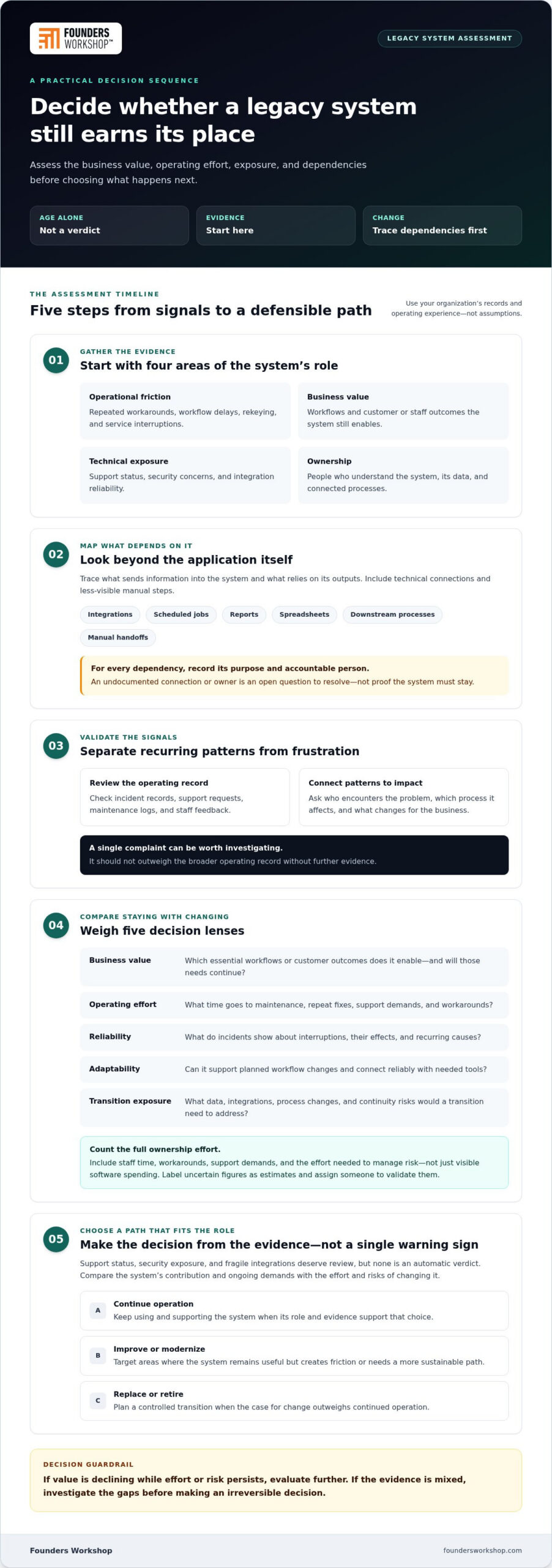
Look for recurring workflow delays, repeated workarounds, rekeying between tools, and service interruptions. Review incident records, support requests, maintenance logs, and staff feedback to establish what happens and how it affects work. Then connect each pattern to a business impact, such as slower customer responses, time spent correcting records, or objectives the system can no longer support.
Separate measured patterns from frustration. Ask who encounters each problem, which process it affects, and whether it persists across teams or occurs only in an isolated case. A single complaint can point to something worth investigating, but it shouldn’t outweigh the broader operating record without further evidence.
What hidden dependencies could make retirement risky?
Before judging a system in isolation, trace what sends it information and what relies on its outputs. Include integrations, scheduled jobs, reports, spreadsheets, and downstream processes. Process owners can also surface manual steps that never appear in a technical diagram, such as copying a report into another workflow.
Record each dependency, its purpose, and the person accountable for it. If an owner or connection is undocumented, treat it as an open question to resolve before approving a change, not as proof that the system must stay.
A practical first pass is to gather evidence across four areas:
- Operational friction: Repeated workarounds, delays, and interruptions.
- Business value: Workflows and customer or staff outcomes the system still enables.
- Technical exposure: Support status, security concerns, and integration reliability.
- Ownership: People who understand the system, its data, and connected processes.
When the record shows declining value alongside persistent effort or risk, further evaluation is warranted. If the evidence is mixed, investigate the gaps before turning frustration into an irreversible decision.
Build the business case: compare the value, risk, and effort of keeping the system
A defensible decision compares the system’s contribution to the business with the effort and exposure involved in keeping it, then weighs both against the work and benefits of changing it. Use internal evidence such as maintenance records, incident trends, staff time, user feedback, and documented business objectives. The goal isn’t to make a complicated system look bad. It’s to understand what the organization gains and gives up under each option.
Total ownership effort includes more than visible software spending. It also includes staff time, workarounds, support demands, and the operational effort needed to manage risk. Capture those demands, even when they sit across different teams or budgets. If a figure is uncertain, label it as an estimate and assign someone to validate it before using it to justify a major change.
- Business value: Which essential workflows or customer outcomes does the system enable, and are those needs likely to continue?
- Operating effort: What do maintenance records and staff accounts show about support work, repeat fixes, manual steps, and workarounds?
- Reliability: What do incident records reveal about interruptions, their effects, and recurring causes?
- Adaptability: Can the system support planned workflow changes or connect reliably with the tools the business needs?
- Transition exposure: What data, integrations, process changes, and continuity risks would a transition need to address?
How do you compare continued operation with a planned sunset?
Write down the business outcomes the current system still enables, then record its ongoing support demands and operational risks. Compare that picture with the transition effort and the capabilities the business needs in the future. A system may remain valuable for a core workflow even if another part creates repeated manual work. Separate those roles instead of assuming the whole application must stay or go.
For each finding, record its evidence, business impact, confidence level, and accountable owner. This makes assumptions visible. A technical lead might validate a maintenance pattern, while a process owner confirms whether a workaround is necessary. If a key assumption remains unverified, treat it as a decision gap, not a settled argument for keeping or retiring the system.
Which alternatives belong in the decision?
Compare continued operation, targeted refactoring, broader modernization, replacement, and retirement. Refactoring addresses code-level problems, but doesn’t automatically change the system’s business role or resolve every integration and workflow limitation. Refactoring legacy code strategies can help clarify when improving the existing code may fit. Compare every path against the same outcomes, risks, and ownership needs.
A modernization checklist can also structure assessment and transition planning. A legacy software modernization checklist can help assess existing systems, decide what needs to change, and plan a migration that protects critical workflows. Use it to prompt questions, then ground the answers in your own processes and records.
When leaders ask when to sunset a legacy system, the comparison should make trade-offs explicit, not force a predetermined answer. If you’re shaping a transition around business outcomes, legacy software planning can help connect the decision to workflow and technical needs.
Sunset, modernize, or replace? Match the path to the system’s role
Choose a path based on what the business still needs from the system, not its age or the appeal of a particular technology. Useful workflows may deserve to continue even if the current implementation needs to change. The decision is about preserving the right capabilities while choosing a sustainable way to deliver them.
Compare the options against the same practical questions: What business need does this path serve? How could it affect continuity? What data must remain available or move? Who will own the system afterward?
| Path | Business fit | Continuity implications | Data needs | Ongoing ownership |
|---|---|---|---|---|
| Operate | The system continues to meet current needs. | Preserves existing workflows, while known limitations remain. | Maintain required access and protection. | Keep support and risk ownership clear. |
| Improve in place | Specific defects or code issues can be addressed without changing the system’s role. | Changes may affect existing processes and need careful validation. | Confirm that improvements preserve data behavior. | Assign responsibility for changes and future maintenance. |
| Modernize | Valuable capabilities remain, but the implementation or architecture limits future needs. | Plan the work around dependencies and essential workflows. | Determine what to migrate, retain, or make accessible. | Define responsibility for the modernized components. |
| Replace | Core requirements need a different solution. | Plan transition, testing, and cutover to protect operations. | Map, move, and validate necessary information. | Establish ownership of the new software and integrations. |
| Retire | The capability is no longer needed or a supported alternative serves it. | Confirm connected processes can operate without the system. | Review retention and access needs before shutdown. | Assign responsibility for remaining records and dependencies. |
When is targeted modernization a better fit than retirement?
Consider targeted modernization when important workflows still serve the business, but specific components constrain change. Focused code improvements can address maintainability issues without changing the application’s overall role. Broader architectural or platform changes affect more of how the system is built or operated. Assess dependencies, user needs, and technical constraints first, then define a scope that addresses the identified problem before implementation begins.
When does replacement or retirement make more sense?
Replacement may fit when essential needs can’t be met through viable incremental changes. Retirement may fit when the underlying capability is no longer needed or a supported alternative already serves it. Replacement still requires a transition plan for workflows, data, and integrations. Retirement also needs review: shutting down an application doesn’t mean discarding information without considering future access and business needs.
There is no universally cheaper, faster, safer, or better path. The right answer depends on the system’s role and the organization’s ability to manage the chosen approach. A clear comparison helps teams decide when to sunset a legacy system, and when another path can preserve value with less disruption.
Use this legacy system sunset checklist before approving the decision
Approval should follow a documented review, not an informal agreement that the system is “old” or difficult to support. This checklist turns the decision into specific responsibilities and readiness tests. Assign a named owner to every decision and unresolved risk, so business, technical, and data questions don’t disappear between teams.
- 1. Name the decision owner. Identify the accountable business leader, affected teams, and person authorized to approve the intended end state. Make clear who resolves disagreements about priorities or acceptable operational risk.
- 2. Define the outcome. Record whether the system will continue operating, change, be replaced, or be retired. State which business capabilities must remain available, and name the teams responsible for delivering them after the change.
- 3. Confirm dependencies. Document connected applications, integrations, scheduled tasks, reports, spreadsheets, and manual steps. Ask process owners to validate what they rely on, then assign an owner to investigate every undocumented or uncertain dependency.
- 4. Decide data needs. Identify information that must move, remain accessible, or be retained for business use. A named data owner should approve the plan for access, migration, and validation, including how teams will retrieve needed records after shutdown.
- 5. Review obligations and open risks. Have the organization’s responsible stakeholders identify applicable internal policies and review obligations. Record unresolved technical, operational, and data risks, with an accountable owner and a clear action or decision for each.
- 6. Set acceptance and cutover criteria. Define how the team will demonstrate continuity, confirm required access, validate connected workflows, and establish that the transition is complete. Assign owners to each test and specify who can approve cutover or pause it if criteria aren’t met.
What should be confirmed before approving a sunset?
Approval depends on more than a proposed shutdown date. Confirm that the business owner accepts the intended outcome, affected teams understand what will change, and dependency and data reviews have named owners. Where information must remain available, document who approves that access plan. If an internal policy or review obligation is unclear, route it to the organization’s responsible stakeholder before approval.
How can teams reduce disruption during the transition?
Sequence work around essential workflows. Tell affected users what is changing, when it affects their work, and where to report problems. Provide training suited to the new process. Define observable measures of success, such as completing a key workflow and accessing required information. A phased rollout or parallel operation can help in some situations, but use either only when the system and business context justify it.
A sunset is ready only when owners, dependencies, and transition criteria are explicit. For a Texas organization coordinating teams across offices or functions, a shared decision record helps business and technical stakeholders work from the same approved plan. Founders Workshop can align that plan with replacement software, integrations, and workflow requirements through software transition work.
Turn the sunset decision into a workable modernization plan
A sound decision needs a practical route from assessment to changed operations. Turn findings into a scoped roadmap that connects each technical task to a business outcome, such as preserving a customer-facing workflow, reducing manual steps, or making essential information accessible. The selected path should guide the work: retaining a system calls for sustainable ownership, while modernization or replacement calls for defined transition deliverables.
What should a legacy-system transition roadmap contain?
Keep the roadmap specific enough to guide decisions, but flexible enough to respond to what the team learns. It should capture:
- The chosen path and business goals: State what will change, what must continue, and how the decision supports business priorities.
- Dependencies and data needs: Identify affected systems, workflows, information, and access requirements that shape the sequence of work.
- Owners and deliverables: Name accountable business, technical, and data owners, then break the effort into reviewable decisions and outputs.
- Evaluation criteria: Define how the organization will assess retained or new workflows after transition, including whether essential work can be completed and information accessed as intended.
Sequence work around dependencies. For example, a replacement workflow may rely on an integration being ready before users can complete the process in the new software. Make that relationship visible in the roadmap rather than treating development, data movement, and user readiness as separate efforts. Set decision points and acceptance criteria, but avoid promising timelines before scope and dependencies are understood.
After the transition, evaluate outcomes against the original business goals. If the objective was to reduce manual handling, establish how the team will determine whether that workflow changed as intended. Assign someone to review the result and raise issues that need follow-up. This creates a feedback loop instead of treating cutover as the only measure of completion.
How can Founders Workshop support the next step?
Once leaders agree on when to sunset a legacy system, execution still requires coordination between business needs and technical decisions. Founders Workshop’s managed teams bring product strategy, UI/UX, and technical architecture together to shape work around the selected path. That may mean modernizing a legacy application, developing replacement software, or integrating systems so information supports intended workflows.
The work should reflect the decision, not assume every assessment ends in a rebuild. If targeted modernization is the right fit, scope can focus on the components that constrain business needs. If replacement is warranted, the roadmap can align software development with workflow design, dependencies, and transition requirements. If the system will remain in use, technical planning can still address how its role and ownership fit the business direction.
Founders Workshop is Dallas-based and works remotely with businesses across the United States. For Texas leaders and teams elsewhere, a managed project team can help translate assessment findings into coordinated product and technical work, with business outcomes guiding implementation.
Contact Founders Workshop for a consultation to discuss your legacy software decision and next steps.
Make the next step a deliberate one
The decision about when to sunset a legacy system can shape how confidently your business adapts next. Treat the chosen path as a commitment to a business outcome, not simply a technical milestone. Keep the people responsible for the workflow involved as the plan moves forward, and revisit assumptions if operational needs change.
For leaders in Dallas, Fort Worth, Plano, Frisco, Irving, and teams across the United States, Founders Workshop can turn a legacy software decision into coordinated product and technical work. Its leadership brings more than 30 years of experience, with managed teams covering product strategy, UI/UX, and technical architecture. That experience supports practical next steps, whether your direction involves modernizing an application or building integrations around evolving workflows.
Contact Founders Workshop for a consultation to discuss a transition plan aligned with your business goals. With clear ownership and a grounded roadmap, your team can move forward with greater confidence.
Frequently Asked Questions
Is a legacy system automatically a system that should be retired?
No. A system’s age alone doesn’t show whether it still serves the business well. If it reliably supports a distinct process and can be maintained responsibly, continued use may make sense. For example, an older application used for a stable internal task may not need immediate replacement. Assess its role, limitations, and future fit before treating age as a reason to retire it.
Can a business sunset only one part of a legacy system?
Yes, if the system’s functions can be separated without breaking essential workflows. A business might replace one reporting component while keeping another capability in place. First, identify which functions share data, permissions, or processing, then test what depends on the component being removed. A focused change can reduce unnecessary disruption, but only if the remaining system can still operate as intended.
What should we do when a vendor ends support for a system?
Start by confirming which version and components are affected, along with the vendor’s stated support terms. Then review the system’s role, exposure, and available paths, such as an upgrade, modernization, or replacement. Identify interim safeguards and assign someone to track decisions and risks. A support deadline raises the priority of the review, but the response should still account for business continuity and dependencies.
How can we uncover undocumented workflows before retiring an application?
Combine technical clues with conversations about how work actually gets done. Review access records, scheduled tasks, exports, recurring reports, and files exchanged with other tools. Ask employees to walk through a real task from start to finish, including steps they handle outside the application. In Dallas-Fort Worth teams, include staff across relevant departments and locations so local workarounds don’t remain invisible.
Does sunsetting a system mean deleting all of its data?
No. Retirement of the application and disposition of its data are separate decisions. Determine which records people may still need, how they should access them, and who is responsible for that decision. Teams might need historical information for reference even after daily work moves elsewhere. Document the chosen access approach and validate that users who need the information can retrieve it before shutdown.
Who should approve a legacy system sunset?
The accountable business leader should approve the decision because it changes how business work is supported. That leader should consider input from technical staff, process owners, and the person responsible for relevant data. For a system used across departments, approval should reflect the needs of each affected group, not just the team that maintains the software. Make clear who can accept open risks and authorize the transition.
What should employees be told before a legacy system is sunset?
Explain what is changing, why the decision was made, which tasks or teams are affected, and what employees should use instead. Give people enough notice to prepare, and make training relevant to their responsibilities. Share where to report a problem and who will respond. A clear message helps employees distinguish planned changes from system issues and gives leaders early visibility into workflow gaps.
Contact Founders Workshop for a consultation about your legacy software transition.