

What if your next ERP investment connected the workflows that matter most without replacing every tool? For a growing company, building a custom ERP system for small business can seem like the answer when customer, inventory, finance, and operations data are scattered across disconnected systems. But custom software is not automatically the better investment if a packaged platform or a focused integration can solve the problem.
It’s reasonable to want software that reflects how your business actually runs, especially when standard processes force your team into workarounds. The key question is whether custom development will remove enough friction to justify building and maintaining the system over time.
This guide compares custom ERP with buying or extending existing software, explains how to prioritize capabilities, and covers requirements, integrations, rollout, and ongoing development. Founders Workshop is a Dallas-based software development team serving businesses across Texas and the United States. The focus here is a practical first release built around proven workflows, not an ambitious attempt to replace every tool at once.
Key Takeaways
- Start with a specific operational bottleneck. Trace how work, decisions, and information move through the business before defining an ERP solution.
- Map user roles, permissions, essential records, reporting needs, and data ownership to turn business requirements into clear priorities.
- Compare packaged software, custom development, and extending existing systems based on process fit, integration needs, flexibility, and internal ownership.
- Approach building a custom ERP system for small business in phases, prioritizing one complete, valuable workflow for the first release.
- Align discovery, user experience, architecture, integrations, and implementation around business outcomes and a practical adoption plan.
Building a Custom ERP System for a Small Business: Start With the Business Problem
Should you build an ERP to resolve a recurring operational bottleneck, or would that mean replacing systems that already do their jobs? Start with the friction, not the software. If staff repeatedly re-enter order details, wait for inventory updates, or reconcile conflicting reports, connected systems may help. If the problem is temporary or isolated, a full ERP could add complexity without fixing its cause.
An ERP is software that coordinates connected business workflows through shared operational information. Unlike disconnected apps, it links the records and steps teams rely on, so an update in one part of a process can inform the next. The broader history and components of Enterprise resource planning (ERP) help explain the concept, but the right scope depends on how your business operates.
Fragmented records can lead to duplicate entry, delays, and inconsistent reporting. A sales team, for example, might record an order in one tool while operations tracks fulfillment in another. If those systems don’t share current information, employees may spend time checking which record is accurate instead of acting on it. Building a custom ERP system for small business should address a defined operating need, not serve as a technology upgrade for its own sake.
Which business problems can an ERP bring together?
Consider where information must pass between teams. A business might connect customer records and orders with inventory, purchasing, and accounting, allowing a confirmed sale to inform fulfillment and financial tracking. Shared records can reduce repeated data entry and give teams a more consistent view of the work. Include only the workflows that solve a real coordination problem; not every business needs every function.
How do you know your business is ready?
Look for recurring friction: manual handoffs, repeated reconciliation, or reports that arrive too late to guide decisions. Then check whether the people doing the work can describe the process, including exceptions, in roughly the same way. If ownership is unclear or every case follows a different path, clarify the process before encoding it in software.
Distinguish a persistent operating constraint from a temporary growth-stage inconvenience. A sustained bottleneck may justify coordinated internal software when the business case is clear, the workflow has an accountable owner, and the expected benefit goes beyond having newer technology. A Dallas-Fort Worth distributor, for instance, might track how often staff reconcile separate order and inventory records. That evidence is a stronger starting point than a general desire to “have an ERP.”
Define Custom ERP Requirements Around Workflows, Data, and Integrations
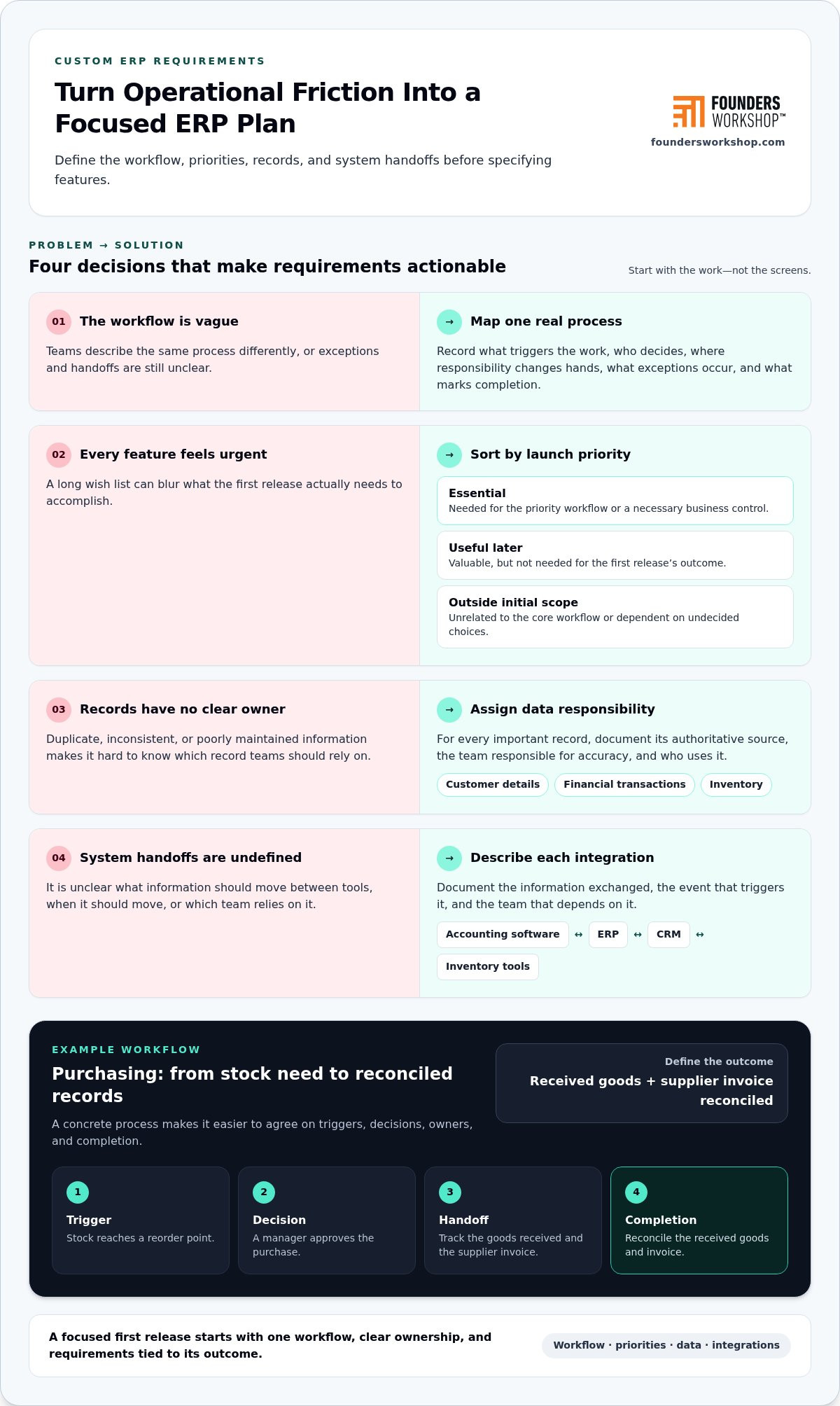
Once the business problem is clear, translate it into requirements people can validate. Start with a real workflow and map each step: what triggers the work, who makes a decision, where responsibility changes hands, what exceptions occur, and what outcome marks completion. For example, a purchasing process might begin when stock reaches a reorder point, require manager approval, and end when received goods and the supplier invoice are reconciled.
Prioritize the workflow outcome before specifying screens or features. This keeps requirements grounded in what the business needs to accomplish, rather than assumptions about what the software should look like. For anyone building a custom ERP system for small business, the distinction keeps the first release focused and gives designers and developers a shared definition of success.
How should a small business prioritize ERP features?
Anchor each proposed capability to the primary operational bottleneck. Record who will use it, what decision or action it supports, and what happens if it’s delayed. Then classify it as essential for launch, useful later, or outside the initial scope. This makes trade-offs visible and reduces the risk of treating every request as equally urgent.
- Essential: Required to complete the priority workflow or meet a necessary business control.
- Useful later: Valuable, but not needed to deliver the first release’s outcome.
- Outside initial scope: Unrelated to the core workflow or dependent on decisions the team hasn’t made.
Prioritize by business impact and dependency. A report that supports a critical decision may be essential for launch, while a redesigned dashboard may wait. If a feature depends on clean customer or product records, address that data need first. The aim isn’t to minimize ambition; it’s to sequence the work so each capability has a clear reason to exist.
What should the team document about data and integrations?
For each important record, name its authoritative source and the team responsible for keeping it accurate. Customer details might live in a CRM, accounting might own financial transactions, and an inventory tool might track stock. Document which information must move between systems, what event triggers the exchange, and which team relies on it. Include role-based access needs, reporting dependencies, and known data-quality issues.
- List essential records, their source systems, owners, and users.
- Describe what information passes between accounting software, CRM, inventory tools, and the ERP, and when.
- Note duplicate, incomplete, or inconsistent records that could affect workflows or reports.
These details help the team design integrations around actual business events instead of connecting systems simply because a connection is possible. A requirements workshop with Founders Workshop’s software team can help stakeholders align workflow outcomes, data ownership, and technical priorities before implementation begins.
Custom ERP vs. Off-the-Shelf Software: Choose the Right Fit
The right choice depends on how closely available software fits your operating model, what it can connect to, and who will own it over time. Packaged software, custom development, and extending existing systems each address different needs. None is automatically the cheapest or best option. Compare the full fit, including configuration, integration, adoption, and ongoing care.
| Approach | Often fits when | Key trade-off |
|---|---|---|
| Packaged ERP | Your core processes are established and align with the platform’s capabilities. | You may need to configure workflows or adapt some processes to the software. |
| Custom ERP | Distinctive workflows or integration constraints can’t be addressed practically through configuration. | Your business takes responsibility for continued maintenance and product decisions. |
| Extend existing systems | Current tools work well individually, but a targeted integration or addition could close the gap. | You’ll need to manage how the extension fits with the systems and processes around it. |
When does packaged ERP make more sense?
Packaged ERP is a strong candidate when your established processes resemble the workflows the software supports. Review how it handles the work your team needs to complete, what configuration is available, and whether it connects with essential systems. Adoption matters too: a capable platform won’t deliver its intended value if staff find its workflows difficult to use consistently.
Configuration may address a gap without custom development. If a standard process works but a field, approval step, or report needs adjustment, first determine whether the platform can support it through its existing settings. This helps distinguish a genuine mismatch from a preference that can be accommodated without creating a separate system to maintain.
When is custom ERP worth evaluating?
Custom development is worth evaluating when workflows that materially shape your operations resist practical configuration, or existing tools can’t support necessary connections. A Texas company coordinating specialized order and fulfillment processes, for example, might assess whether its current software supports those handoffs reliably. The case for building a custom ERP system for small business strengthens when the operational benefit is clear and leadership can guide product decisions beyond launch.
Be direct about the trade-off: custom software creates an ongoing responsibility to maintain and evolve it as business needs and connected systems change. Consider whether the organization can assign ownership, make decisions, and support continued system care. If an older application is part of the decision, weigh modernization against replacement; this legacy code modernization guide can help frame that assessment.
Extending a current system may be the more measured option if the problem is limited and the underlying tools remain useful. Compare each path against the same criteria: process fit, flexibility, integration needs, internal ownership, and likely change over time. That keeps the decision tied to business outcomes rather than the appeal of a particular technology.
Plan a Phased ERP Build, From Discovery Through Adoption
A phased approach gives the team opportunities to test assumptions before expanding scope. The sequence should reflect business requirements, system dependencies, and the readiness of the people who will use and support the ERP. There’s no responsible fixed timeline for every project; the work depends on what the business needs to connect and validate.
A practical path includes six stages:
- Discovery: Confirm the operating goals, stakeholders, current systems, and constraints.
- Workflow definition: Agree on the process the ERP will support, including exceptions and completion criteria.
- Technical planning: Plan system architecture, integrations, data migration, and access needs.
- Prioritized release: Build the smallest complete workflow that can deliver useful business value.
- Validation: Test the workflow and data with representative users, then resolve issues before broader use.
- Rollout: Prepare staff, provide guidance, and assign ownership for support and future decisions.
What belongs in the first ERP release?
Choose a coherent workflow with defined users, inputs, outputs, and a way to assess whether it works as intended. Include the integrations and reporting needed to complete that workflow, not every connection or dashboard someone might eventually want. An initial purchasing workflow, for example, might need purchase requests, approvals, and the relevant accounting connection, while other modules can wait until real use reveals what should come next.
A focused first release makes feedback actionable. Staff can identify a specific handoff or result that needs attention instead of reacting to a broad system before its purpose is clear.
How should rollout and maintenance be planned?
Before expanding access, have representative users exercise the core workflow with realistic scenarios and data. Plan data migration and integration checks as part of validation, not as last-minute tasks. Prepare employees for process changes, explain where to get support, and name the people responsible for product decisions. Defects, security updates, integration changes, and enhancements remain ongoing responsibilities after launch.
How can small teams build in manageable stages?
Keep each stage tied to an outcome the business can evaluate. Staged validation may reveal that an approval step works differently in practice or that users need information presented another way. Capture those findings before committing to additional scope. This minimum viable product development guide offers a useful perspective on keeping an initial release focused.
For a small team, let observed needs guide the next investment. Defer speculative features until users have worked with the initial release and the organization can identify which improvements will make a practical difference.
Choose an ERP Development Partner and Set Up the Project for Success
A strong development partnership connects business priorities to technical decisions and keeps responsibility clear throughout the work. Evaluate how a partner approaches discovery, technical planning, communication, and accountability. Can they help define the operational goal and project boundaries before discussing features? Will they explain how architecture and integrations support that goal, and make decisions, risks, and progress visible to business stakeholders?
ERP work crosses disciplines. Product strategy clarifies what the system should accomplish, UX design shapes how people complete their work, technical architecture supports the required workflows and connections, and implementation turns those decisions into working software. Each part should support agreed business outcomes, not operate as a separate workstream without a shared purpose.
What should a productive ERP engagement establish?
At the outset, define the operational goal, boundaries, decision-makers, and how progress will be assessed. Align business stakeholders and technical contributors on requirements and delivery priorities so scope changes have a clear decision path. Establish how integration questions, user feedback, and ongoing ownership will be handled. A shared understanding of these responsibilities helps the team resolve trade-offs without losing sight of the business need.
How does Founders Workshop support custom internal software?
Founders Workshop builds custom internal software and system integrations to support operating workflows. Project teams can bring together product strategy, UI/UX design, technical architecture, and implementation, connecting the business case with how the software is designed and built. The leadership team brings more than 30 years of experience, and Founders Workshop was founded in 2005. That experience supports a disciplined focus on business needs as well as technical delivery.
For a company building a custom ERP system for small business, requirements, user experience, integrations, and architecture are related decisions. The right combination depends on the workflow and existing systems involved. Clear ownership and communication help stakeholders understand what is being built, why it matters, and how future decisions will be made.
What is the next step for a Dallas or Texas business?
Bring a specific workflow problem to the first conversation, along with the tools involved, the people affected, and the outcome you want to improve. Founders Workshop is Dallas-based and works with Texas businesses, including companies in Dallas, Fort Worth, Plano, Frisco, and Irving, as well as clients remotely across the United States. These details give the discussion a practical starting point for custom internal software, system integration, or both.
For a consultation about your ERP requirements and development approach, contact Founders Workshop.
Turn the ERP Decision Into a Practical Next Step
The most useful outcome of evaluating ERP isn’t a commitment to build. It’s a clearer decision about what should change, what can stay, and what the business is prepared to own. Before moving forward, align the people responsible for operations and technology on the result that matters most. That shared direction gives any next step a sound business foundation.
If custom development is worth exploring, start with the workflow that’s creating friction, the systems involved, and the improvement your team needs. Building a custom ERP system for small business is a long-term operating decision, so the right plan should reflect both today’s needs and how you expect the business to evolve.
Founders Workshop can help turn that decision into a practical development path. Contact Founders Workshop for a consultation to discuss your ERP goals and next steps.
Frequently Asked Questions
Is a custom ERP system practical for a small business?
Yes, if it solves an important operating problem and the business can take responsibility for the software after launch. Building a custom ERP system for small business is more practical when a repeatable workflow is difficult to support with existing tools and the expected operational benefit is clear. A focused system for one core process may be a more sensible starting point than trying to replace every application at once.
How much does building a custom ERP system for a small business cost?
There isn’t one reliable price for every project. The estimate depends on factors such as the workflows included, connections to existing systems, data migration, user access needs, and the work required to maintain the system. To compare proposals meaningfully, define the first release and ask that build work, integrations, migration, testing, and ongoing care be addressed as distinct parts of the project scope.
Can a custom ERP work with the software my business already uses?
Yes, a custom ERP can be designed to exchange information with existing software when the systems provide a workable way to connect. For example, an ERP might pass approved order details to accounting while leaving customer relationship management in a separate CRM. Before planning the connection, identify which system owns each record, what information needs to move, and what should happen if an update fails.
What happens if our business processes change after the ERP launches?
Changes can be handled through ongoing product decisions and software updates, with the approach depending on what changed and how the system was designed. A new approval step may require a smaller adjustment than a change to how records move between departments. Keep a record of requested changes, their business impact, and affected integrations, then test updates with users before relying on them in daily operations.
Does a small business need an ERP, or can it use separate applications?
Separate applications can be sufficient if teams can complete their work without costly delays, repeated reconciliation, or confusion over which record is current. A company with distinct sales, accounting, and inventory tools might connect only the points where information needs to pass between them. Consider broader ERP coordination if those handoffs become a recurring constraint, rather than assuming every business needs one system for every function.
Is custom ERP the same as CRM software?
No. ERP software generally supports internal operations such as purchasing, inventory, and financial workflows, while CRM software focuses on customer interactions, sales activity, and relationship management. Their responsibilities can overlap around records such as customers and orders. A business may keep both systems and connect relevant information, or combine selected functions when that better supports its workflows and data ownership needs.
Can a custom ERP system be expanded as a small business grows?
It can be expanded if the design accounts for future needs, but growth isn’t automatic or unlimited. New workflows, users, reports, and integrations may require additional development and testing. For example, a business serving customers across Dallas, Fort Worth, Plano, Frisco, and Irving might later need different fulfillment processes as its operations change. Plan expansion around proven needs and keep ownership of future decisions clear.
Contact Founders Workshop for a consultation about your ERP goals.