

What if the biggest risk in developing a custom patient portal isn’t the technology, but building the wrong workflows around it? A portal can look polished and still create extra work if it doesn’t fit how patients seek care, how staff coordinate, or how existing systems share information.
Those concerns are familiar to healthcare leaders weighing a custom build against configurable software. The right choice depends on patient needs, care operations, and the systems a portal must work with, not on the appeal of a longer feature list.
This guide explains how to define a right-sized first release, compare custom development with configurable options, and plan from discovery through launch and ongoing improvement. You’ll learn how to align patient and staff workflows with EHR and operational systems before development begins. Founders Workshop is Dallas-based and works with healthcare organizations across the United States, bringing strategy, design, development, and system integration into one practical planning conversation.
Key Takeaways
- Map appointments, forms, messages, and care information to spot where patient interactions become fragmented.
- Gather input from patients, clinicians, administrative staff, and leadership; their priorities may differ.
- Compare custom, configurable, and existing-system options using workflow fit, integration flexibility, user experience, control, and maintenance.
- Inventory systems, data ownership, and dependencies early, and build privacy, access control, and security into project decisions.
- Make developing a custom patient portal a phased effort: align on outcomes, design workflows, prioritize scope, validate, and improve.
Why develop a custom patient portal around your care workflows?
A patient portal is a digital access point for selected services and information patients need to interact with a healthcare organization. Depending on the organization’s needs, it may bring together tasks such as appointment requests, forms, secure messages, and access to care information. The patient portal concept is distinct from the systems that manage clinical records behind the scenes.
A portal doesn’t replace an EHR, which supports clinical documentation and other internal care operations. It’s also not simply a general-purpose mobile app. Its purpose is to make specific patient-facing interactions easier while fitting the clinic’s existing processes. When those interactions are spread across phone calls, paper forms, email, and separate tools, patients can face a disjointed experience and staff may need to bridge gaps manually.
Which patient and clinic problems should the portal solve?
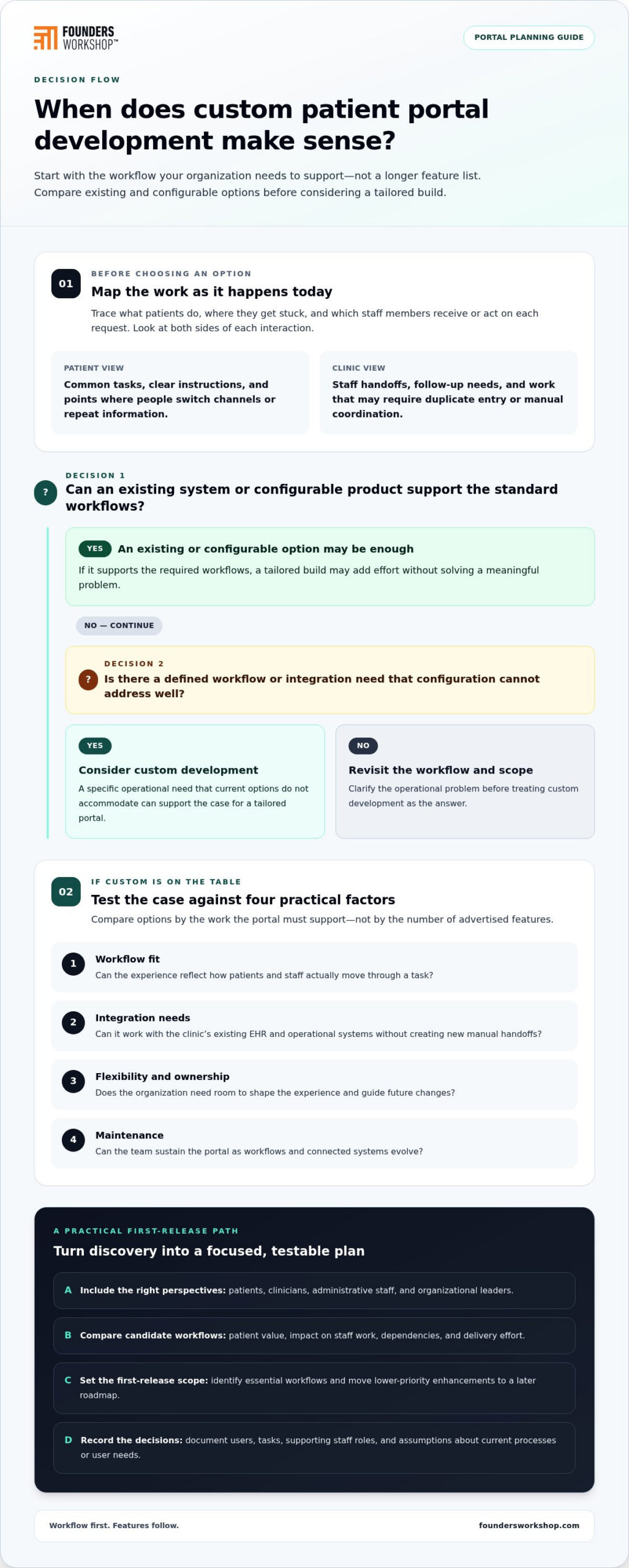
Start by tracing the work as it happens today. Note what patients do, where they get stuck, and which staff members receive or act on each request. Then separate recurring friction from edge cases and ideas that can wait.
For example, a Dallas-Fort Worth clinic might find that patients call to request appointments, complete intake forms on paper, and phone again to ask whether their information arrived. Front-desk staff then transfer details between tools and follow up with clinical teams. A portal plan could prioritize a clearer appointment-request and intake journey, while leaving occasional requests or future features outside the first scope.
Map both sides of each interaction. Patients may need straightforward access to common tasks, while clinicians need information presented in a way that supports established handoffs. Administrative staff may care most about reducing duplicate entry or identifying requests that need follow-up. These needs can overlap, but they aren’t automatically the same.
When does custom development make sense?
Custom development is worth considering when a defined workflow or integration need cannot be addressed well through configuration alone. Compare options against the work the portal must support, not the number of features they advertise.
- Workflow fit: Can the experience reflect how patients and staff actually move through a task?
- Integration needs: Can it work with the clinic’s existing EHR and operational systems without creating new manual handoffs?
- Flexibility and ownership: Does the organization need room to shape the experience and guide future changes?
- Maintenance: Can the team sustain the portal as workflows and connected systems evolve?
Customization alone isn’t a business case. If a configurable product or an existing system can support standard workflows, a tailored build may add effort without solving a meaningful problem. If a clinic has distinct handoffs, multiple systems, or patient needs that current options don’t accommodate, custom development may be a better fit. The case for a build should rest on a specific operational need and a scope that addresses it.
Developing a custom patient portal should begin with the workflow, not a feature wish list. Founders Workshop’s healthcare technology solutions work connects product decisions with design, development, and system integration, helping teams assess where a tailored approach can support care delivery.
How to turn patient and staff needs into a portal plan
A useful portal plan starts with people and tasks, then turns what you learn into a clear, testable first release. Don’t begin with a feature list. Document who needs the portal, what they’re trying to accomplish, where the current journey breaks down, and what the clinic needs to make each step work.
Map users, tasks, and service journeys
Include patients, clinicians, administrative staff, and organizational leaders in discovery. Their priorities overlap, but they aren’t interchangeable: patients may value clear instructions, clinicians need appropriate information at the right handoff, staff need workable processes, and leaders need progress tied to operational goals.
Trace a representative journey from first access through a follow-up interaction. Record each action, handoff, delay, and point where someone must switch channels or repeat information. Ask how patients use phones or computers, what accessibility needs affect task completion, and whether instructions are clear without staff interpretation. These details can shape requirements before interface design begins.
Prioritize a realistic first release
Turn discovery into candidate workflows, then compare them by patient value, impact on staff work, dependencies, and delivery effort. A feature that looks simple to users may depend on changes to a connected process, so capture those dependencies rather than treating each request as isolated.
Use the comparison to identify essential workflows for the initial release and move lower-priority enhancements into a later roadmap. A related HIPAA-compliant application development checklist can help frame planning considerations, but keep the portal’s requirements grounded in the specific data, users, and workflows involved.
Before design starts, write down the decisions behind the scope. A practical discovery record should include:
- Users and tasks: Who will use each workflow, what they need to do, and which staff roles support it.
- Assumptions: What the team believes about current processes or user needs, and how those beliefs will be validated.
- Constraints and dependencies: Existing systems, operational handoffs, and decisions that could shape design or delivery.
- Success measures: What the clinic will observe to judge whether a workflow is easier or more reliable.
Keep measures tied to the problem. If the aim is to make intake clearer, define how the team will assess completion and where patients still need help. If the aim is to improve staff handoffs, decide what information or process change would show progress. Agreeing on these measures early helps prevent scope from expanding without a clear reason.
Validate the plan with the people who will use or support it. Walk through proposed journeys, test whether the language makes sense, and revisit assumptions that don’t hold up. This gives design and engineering a shared reference for developing a custom patient portal. Founders Workshop aligns product strategy and technical planning with healthcare workflows; explore Founders Workshop’s software development approach as you shape the next steps.
Custom portal or configurable platform: how to compare the options
There isn’t one right answer for every clinic. A configurable patient portal may cover common needs with fewer decisions about the underlying product, while extending an existing system can preserve familiar processes. A custom portal offers more room to shape the experience, but it also brings responsibility for ongoing maintenance and change. Compare the options against actual workflows, integrations, and ownership capacity rather than assuming more customization means a better fit.
What does a configurable product handle well?
Configurable products can be a practical fit when a clinic’s workflows align closely with capabilities the product already supports. Established patterns may reduce design and implementation work, while configuration can adapt certain details to local processes. The key is fit: the available settings need to support how the clinic serves patients, not just resemble the desired workflow in a demonstration.
Gaps may emerge when a clinic needs distinctive patient journeys, coordination across several systems, or handoffs that don’t match the product’s assumptions. Teams may then need to adjust operations around the tool or manage remaining steps elsewhere. Extending an existing EHR portal can also make sense when its patient-facing functions already support the clinic’s core needs.
What does a custom patient portal make possible?
A tailored portal can reflect defined patient journeys and operational requirements more directly. The clinic can shape how patients move between selected services and how those interactions connect with staff processes. That flexibility comes with ownership: the organization must plan for maintenance, future changes, and disciplined decisions about what belongs in scope.
Configurable product: Often suits established workflows that closely match available functions. Fit depends on the product’s flexibility and its ability to work with the clinic’s systems.
Extend an existing system: Can build on familiar tools and processes when their portal capabilities cover key needs. The project depends on what the system supports and how it connects to other operations.
Custom portal: Can be shaped around distinctive workflows and user journeys. Flexibility, integration effort, ongoing maintenance, and ownership all depend on project requirements.
These are decision patterns, not guarantees. A DFW clinic with standard appointment and information-access needs may find that an existing portal is sufficient. Another organization coordinating distinct services or systems may have a stronger case for a tailored experience. Developing a custom patient portal is most defensible when the team can point to a specific need the other options don’t address well and account for the work required to sustain the solution.
Keep workflow automation in the picture, but don’t treat it as a substitute for a portal. A portal gives patients a way to access selected services and information; automation can support processes behind those interactions, such as routing a request to the right staff workflow. They may complement each other, with the right division of work depending on the clinic’s processes and connected systems.
Compare options using consistent criteria: workflow fit, integration flexibility, patient experience, control over changes, and maintenance. Mark assumptions that depend on system capabilities or operational decisions, then carry them into planning rather than treating them as settled facts. That keeps the choice grounded in organizational needs, not customization for its own sake.
Plan integrations, privacy, and delivery before development begins
A portal’s design depends on what it needs to exchange with existing systems, who is responsible for that information, and what should happen when a connection fails. Map these dependencies before choosing an architecture. That groundwork helps teams avoid building a patient-facing workflow that looks complete but relies on manual steps or unclear ownership behind the scenes.
How should a portal connect with existing systems?
Start with the user-facing tasks, then trace the information and systems each task touches. For an appointment request, document where the request originates, which system or team receives it, and how the patient-facing status should reflect staff action. Identify who owns each data element and whether information needs to move in one direction or be updated across connected systems. For a broader framework, see this EHR and EMR integration guide for healthcare.
Assess available interfaces, data formats, synchronization expectations, and failure scenarios. If a connection is unavailable or information doesn’t match, define what users and staff should see and how the process can continue. Standards such as HL7 FHIR may be relevant to interoperability planning, but they aren’t an automatic requirement for every portal. The right approach depends on the systems, workflows, and exchange needs involved.
How do privacy and security shape delivery?
Include privacy and security decisions during requirements work, not as a final review. Define user roles, access boundaries, and the information each workflow needs to display or exchange. Consider how a patient’s action moves through the portal and connected systems, and where staff responsibilities begin. These decisions should inform design, architecture, development, testing, and release planning.
A HIPAA-compliant application development checklist can help teams organize related planning considerations, but software alone doesn’t guarantee compliance. The organization’s processes and decisions matter too. Treat security review as an ongoing part of delivery, with appropriate attention during design reviews, implementation, and before release.
Testing should cover more than whether a screen loads. Validate complete user journeys, connections to dependent systems, and what happens when information is missing, delayed, or rejected. Include operational readiness: confirm that staff understand the new workflow, responsibilities are clear, and there is a way to identify and respond to problems after launch.
- Journey checks: Confirm that users can complete intended tasks and understand what happens next.
- Integration checks: Test expected information exchange and how the workflow behaves when a connection fails.
- Access checks: Review whether each role can reach only the information and actions intended for that role.
- Operational checks: Prepare staff processes for handling questions, exceptions, and issues that surface after release.
For a DFW clinic connecting a new portal to an existing EHR and administrative tools, this planning makes dependencies visible before they become launch surprises. Developing a custom patient portal is as much a systems and workflow effort as a design and coding effort. Founders Workshop provides healthcare technology development and system integration. Contact Founders Workshop to discuss your portal project.
Build and improve a custom patient portal with a delivery partner
A strong delivery process connects planning decisions to the experience patients and staff will use. Developing a custom patient portal works best as a phased effort, with clear outcomes guiding product strategy, user experience, architecture, development, and system integration. Each discipline should support the same care and operational goals rather than operate as a separate workstream.
A practical path includes:
- Align on outcomes: Confirm the patient and staff problems the portal should address, along with how the organization will assess progress.
- Design workflows: Turn priority journeys into clear steps, screen concepts, and handoffs for review.
- Build the prioritized scope: Develop the agreed workflows and connections, keeping later ideas outside the initial release unless priorities change.
- Validate before release: Test usability, system behavior, and operational readiness against the intended journeys.
- Iterate with evidence: Use experience and feedback after launch to decide which improvements matter most.
This sequence helps teams make trade-offs deliberately. If a requested feature adds complexity but doesn’t advance a defined patient or operational outcome, for example, reconsider it rather than automatically adding it to scope.
What should collaboration look like during the build?
Set shared decision-making expectations early. Name the people responsible for requirements, clinical input, operational decisions, and technical direction, then agree on review points and how decisions will be recorded. Prototypes and workflow reviews give patient-facing teams a chance to flag confusing steps before they become more costly changes. Keep technical trade-offs tied to business outcomes: each design decision should support the care journey, integration needs, or operational process the portal exists to improve.
Product strategy clarifies what to build and why. UX makes those priorities understandable and usable. Architecture accounts for how the portal fits its systems and future needs, while development and integration turn the plan into working workflows. When these perspectives stay connected, a clinic can make informed choices about scope, dependencies, and changes instead of discovering misalignment late in delivery.
What should happen after launch?
Launch begins the next learning cycle. Review usage and feedback against the outcomes established during discovery, and look for points where patients need help or staff still rely on workarounds. Combine patient feedback with staff experience and operational evidence before setting improvement priorities. Then refine the roadmap as needs evolve, keeping the portal aligned with the workflows it supports.
Founders Workshop is a Dallas-based team that works with healthcare organizations on technology and system integration, aligning strategy, design, architecture, and development around project needs. If your DFW clinic is planning a patient portal, contact Founders Workshop to discuss your project.
Turn your portal plan into a practical next step
The next move doesn’t have to be a commitment to build. It can be a focused conversation about the workflow you want to improve, the systems involved, and what a useful first release needs to accomplish. That clarity helps your team decide whether a tailored solution is the right path and what to resolve before development begins.
For healthcare leaders, developing a custom patient portal is ultimately a decision about how technology can support care and operations without adding unnecessary friction. Founders Workshop’s Dallas-based team serves organizations across the United States, combining healthcare technology development and system integration. Its leadership team brings more than 30 years of experience to aligning product strategy, design, architecture, and development around project goals.
Contact Founders Workshop to discuss your patient portal project. A clear first conversation can help turn your priorities into a practical plan.
Frequently Asked Questions
How long does it take to develop a custom patient portal?
There’s no fixed timeline, because delivery depends on the portal’s scope and the systems and workflows it must support. A focused patient-facing experience connected to a familiar process differs from one coordinating several tools or complex handoffs. Discovery, stakeholder reviews, integration work, testing, and operational preparation all affect the schedule. Identify dependencies and decision-makers early so planning can account for them before development starts.
How much does it cost to develop a custom patient portal?
The cost depends on what the portal needs to do, how it connects to clinic systems, and what ongoing maintenance the organization plans to support. A smaller, focused scope differs from a solution with multiple workflows, integrations, and distinct user roles. To form a useful project estimate, first define the essential patient tasks, system dependencies, and operational requirements. Avoid comparing proposals by headline price alone; compare what each scope includes and leaves out.
Can a small clinic develop its own patient portal?
Yes. A small clinic can plan a portal around a narrow, valuable set of patient needs rather than trying to match the feature breadth of a large health system. For example, a Plano clinic might focus on a specific patient intake or follow-up process, then decide whether an existing platform can support it or a tailored build is justified. The clinic should also plan who will own requirements, operational decisions, and future improvements.
What information should a clinic gather before starting a patient portal project?
Gather examples of current patient requests, forms, communication, and staff handoffs, along with a list of systems involved and the people responsible for them. Include representative cases, such as a patient who needs to correct submitted information or staff who must route a request. Note what a successful outcome would look like and what constraints could affect the project. This evidence helps distinguish recurring needs from assumptions based on a few unusual cases.
Can a patient portal be expanded after its first release?
Yes, a portal can be expanded after launch if the organization plans for change and reviews new requests against real experience. For example, feedback may show that patients understand a task but struggle with what happens after submitting it. That can inform a targeted refinement before the team adds an unrelated feature. Keep a roadmap of proposed improvements, dependencies, and expected value so growth remains deliberate rather than becoming a collection of disconnected additions.
What happens if a clinic changes its EHR after a portal is launched?
An EHR change may require the portal’s connections, information mappings, and related workflows to be reviewed and adapted. The impact depends on how the portal exchanges information with the current EHR and which patient tasks rely on that exchange. Before a transition, document those dependencies and identify affected journeys, such as viewing or updating information. Then plan integration changes and test representative workflows with the new system before relying on them in routine operations.
How is a patient portal different from a patient app?
A patient portal describes the patient-facing access point for selected healthcare services and information; a patient app describes software delivered through an application on a device. A portal may be accessed through a website, an app, or both, depending on how it’s designed. The distinction matters because deciding to build an app doesn’t define which patient tasks it should support. Start with the service experience, then choose the access format that fits the intended users and workflows.
Contact Founders Workshop for a consultation about your patient portal project.