Introduction
Most companies don't fail at AI because the technology doesn't work. They fail because they pick the wrong problem.
According to RAND's 2024 research, more than 80% of AI projects fail — twice the failure rate of non-AI IT projects. Meanwhile, Gartner predicted that at least 30% of generative AI projects would be abandoned after proof of concept by the end of 2025, citing poor data quality, escalating costs, and unclear business value.
For founders and SMBs, those failure rates aren't just statistics — they represent real budget, real time, and real momentum lost.
This guide gives you a practical process for identifying AI use cases tied to genuine business pain points, filtering out the ones not worth pursuing, and scaling the ones that actually deliver. The framework is built for founders — no enterprise jargon, no data science prerequisites required.
Key Takeaways
- Start with business pain points and workflow friction, not technology capabilities
- Filter use cases by impact, data availability, and feasibility before committing to a build
- Prioritize quick-win automation use cases first to generate early ROI and build confidence
- A use case is ready to scale only when it produces consistent results against defined success metrics
- Launching pilots without a defined problem to solve is just as costly as doing nothing at all
Why Most AI Initiatives Fail Before They Even Start
The "AI for AI's Sake" Trap
Competitive pressure is real. When a founder hears that their industry is being disrupted by AI, the instinct is to act fast. The problem is that "act fast" usually means launching a pilot before anyone has defined what success looks like. Or whether AI is even the right tool.
The pattern is consistent: teams optimize for the wrong business metrics, technical leads chase the newest technology rather than actual user problems, and organizations start building before they understand the data they have.
The result? Pilot fatigue — a pattern where teams repeatedly run AI experiments that never reach production. This isn't a technology problem. The real failure happens one step earlier, in how organizations choose where to apply AI in the first place.
Three Root Causes Worth Knowing
- Starting with technology instead of a problem — "We should build something with LLMs" is not a strategy. If you can't name the specific workflow it improves, you're not ready to build.
- Relying on self-reported surveys — Employees rarely surface the most painful inefficiencies in a survey. Observation and process data do a far better job.
- Treating discovery as a one-time event — AI use case identification isn't a quarterly workshop. It's an ongoing discipline that evolves as your operations and data mature.
The fix isn't more sophisticated AI. It's a better process for choosing where AI belongs in the first place.
How to Identify the Right AI Use Cases for Your Business
Start With the Problem, Not the Technology
AI use case discovery should begin with a simple question: where are people experiencing friction? That means mapping places where your team, customers, or operations hit repetitive tasks, slow decisions, information gaps, or manual rework.
Sources for this mapping include:
- Customer support ticket analysis
- Direct workflow observation
- Operational data and process logs
- Customer and employee interviews
The goal is a list of friction points — not a wishlist of AI features.
Assess Whether AI Is the Right Tool
Not every pain point warrants an AI solution. A simple decision filter:
AI is a strong fit when the task involves:
- Large volumes of data to analyze or classify
- Pattern recognition across complex, variable inputs
- Personalization at scale across many users
AI is NOT the right tool when:
- A simple rule-based automation or UX change would solve the problem
- The dataset is too small to produce reliable outputs
- The cost and complexity of AI outweigh the benefit
For example: automatically routing support tickets by keyword is a rule-based problem, not an AI problem. Predicting which tickets will escalate based on customer history, sentiment, and behavior patterns — that's an AI problem.
Check Data Availability and Quality
This step stops more AI projects than any technical challenge. Gartner's 2025 research found that 63% of organizations lacked or were unsure of their AI data management practices, and Accenture found that 61% of firms reported their data assets were not AI-ready.
Before committing to a use case, audit:
- What data you currently capture (transactions, support logs, usage behavior, customer records)
- Whether that data is clean, labeled, and consistently structured
- Where the gaps are — and whether filling them is feasible within your timeline
Data gaps discovered before you build are manageable. The same gaps discovered after you've committed budget and development time become expensive detours.
Define Success Metrics Before You Build
Once your data picture is clear, define what success actually looks like — before a single line of code is written. Not "improve customer experience," but specific targets like:
- Reduce average support resolution time from 15 minutes to under 3 minutes
- Increase lead conversion rate from 1.8% to 3.0%
- Cut manual data review time by 60% within 90 days
These metrics serve one function later: they become your go/no-go gate for scaling decisions.
Prototype and Validate in Small Steps
Build a lightweight prototype and test it with a real — but limited — user group. Pay particular attention to where users pause, workaround, or disengage: those moments reveal more than any internal assumption will.
Iteration at this stage is expected. The teams that move fastest through this phase are the ones willing to be wrong early — and adjust quickly.
5 Common AI Use Cases for Startups and SMBs
These five use cases consistently deliver measurable value for SMBs — and they're accessible without an enterprise-level data infrastructure.
| Use Case | Core Value | What the Data Shows |
|---|---|---|
| Customer Support Automation | Faster ticket resolution at scale | McKinsey found one distributor cut resolution time from 15 min → under 1 min with generative AI |
| Sales Lead Scoring | Focus reps on high-probability prospects | A telecom provider reduced account planning from 10+ hours to minutes |
| Content & Marketing Personalization | Faster content production, higher relevance | Generative AI can lift marketing productivity by 5–15% of total spend |
| Predictive Analytics | Smarter demand forecasting and churn reduction | Early supply-chain adopters improved inventory levels by 35%, service levels by 65% |
| Document & Process Automation | Eliminate repetitive manual work | Intelligent automation can handle 50–70% of repetitive tasks with 20–35% cost savings |
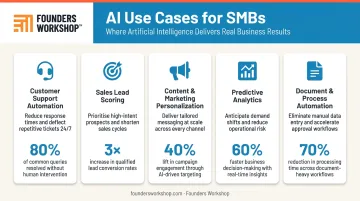
None of these will work out of the box. Each needs to be evaluated against your actual data availability, team bandwidth, and the specific bottleneck you're trying to fix — which is exactly what the identification and scoring process below is designed to do.
How to Prioritize Which AI Use Case to Pursue First
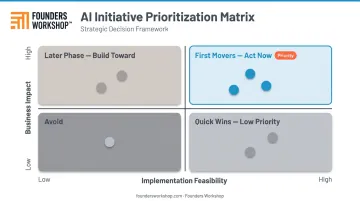
Use an Impact-vs-Feasibility Matrix
Plot each candidate use case on two axes:
- Business impact (revenue generated, costs saved, customer satisfaction improved)
- Implementation feasibility (data availability, technical complexity, time to value)
Use cases that land in the high-impact, high-feasibility quadrant are your first movers. Use cases that are high-impact but low-feasibility belong in a later phase — once you've built the data infrastructure and organizational confidence from earlier wins.
Start With Low-Hanging Fruit
Begin with automation and productivity use cases before pursuing predictive modeling or AI-driven product features. Simple automation is measurable, low-risk, and fast to validate.
This approach does three things:
- Generates early ROI evidence to justify continued investment
- Builds team confidence in AI as a practical tool
- Creates the data infrastructure that more complex use cases will depend on
Align Use Cases to Business Strategy
The most dangerous prioritization mistake is choosing a use case because it's technically interesting. Before committing to anything, ask:
- Does this use case strengthen a core competitive advantage?
- Does it directly support a stated revenue, retention, or efficiency goal?
If the answer is no to both, deprioritize it regardless of how appealing it looks.
Also factor in "spillover value." AI assets (datasets, models, pipelines) built for one use case can often be reused for the next. A churn prediction model for your customer success team might share the same data pipeline as a lead scoring model for sales. Prioritizing use cases that generate reusable infrastructure compounds your return over time.
How to Scale AI Use Cases That Are Working
Know When a Use Case Is Actually Ready to Scale
A use case is ready to scale when three conditions are met:
- The pilot produced consistent, measurable results against your predefined success metrics
- The underlying data pipeline is reliable and consistently structured
- There is a clear process for human review of AI outputs
Scaling before these conditions are met is one of the most common and costly mistakes in AI deployment. Premature scaling doesn't accelerate results — it amplifies problems.
Standardize Before You Expand
Scaling is not deploying the same pilot to more users. It requires:
- Documented workflows for how the AI system interacts with human processes
- Data quality standards and validation checks
- Monitoring dashboards to track model performance over time
- Escalation protocols for when the AI encounters edge cases or makes errors
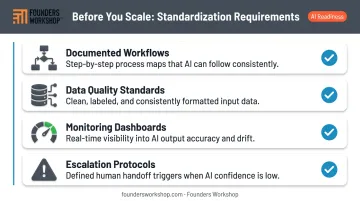
Without standardization, scale introduces chaos rather than efficiency. The operational debt accumulates fast.
Build a Human-in-the-Loop Review Structure
AI models drift. Real-world data changes. A model that performed well during the pilot may gradually degrade as it encounters patterns it wasn't trained on. Stanford HAI defines model drift as performance degradation that occurs when real-world data shifts from training data — and it happens to every deployed model eventually.
A human-in-the-loop structure addresses this:
- Humans review a sample of AI outputs on a regular cadence
- Accuracy degradation is caught before it affects customers or decisions
- Edge cases and exceptions are handled with human judgment, not forced through an AI system that wasn't designed for them
Measure ROI and Iterate Continuously
Track the ROI metrics you defined in the identification phase. Monitor for model performance drift. Feed real-world results back into your next round of use case discovery.
Each AI deployment builds compounding value. The processes, data pipelines, and team fluency you develop for your first use case make every subsequent one faster and cheaper to implement.
For founders and SMBs who have validated an AI use case and are ready to scale, working with an experienced development partner can cut timelines considerably. Founders Workshop's nearshore AI development model and 5D Process allow companies to scale validated AI use cases at roughly one-third the cost of a US-based in-house team — without sacrificing speed or quality. The D5 Dedicated Developer support phase means the engagement doesn't end at deployment; monitoring, maintenance, and continuous iteration are built into every engagement.
Frequently Asked Questions
What are 5 current common use cases for AI?
The five most accessible AI use cases for businesses today:
- Customer support automation — chatbots and intelligent ticket routing
- Lead scoring — prioritizing prospects by conversion likelihood
- Content personalization — tailored marketing at scale
- Predictive analytics — demand forecasting and churn prediction
- Document and process automation — data extraction and report generation
How do you know if an AI use case is worth pursuing?
A use case is worth pursuing when it addresses a clearly defined business pain point, you have sufficient and relevant data to support the AI system, success can be measured with concrete metrics, and the expected ROI justifies the implementation cost. If any of these conditions are missing, address the gap before building.
What is the difference between identifying and scaling an AI use case?
Identification is the process of discovering which problem AI can solve and validating it with a small prototype. Scaling means deploying a proven solution more broadly — with standardized workflows, data quality standards, performance monitoring, and human review structures in place. You cannot skip from idea to scale.
What are the most common reasons AI initiatives fail?
The top failure modes are: choosing the wrong problem (too vague, too small, or not an AI problem at all), starting with technology instead of business needs, lack of clean and sufficient data, and attempting to scale before a use case has been properly validated with measurable results.
Do I need a large dataset to start implementing AI?
It depends on the use case. Applications that use large language models via API require little to no proprietary training data. Custom predictive models — like churn prediction or demand forecasting — need substantial historical data. The key is to audit your data availability early and match the use case to what you actually have.
How long does it typically take to scale an AI use case in an SMB?
Simple automation use cases can move from pilot to production in weeks. More complex predictive or generative AI applications typically take several months. Working with an experienced development team — like Founders Workshop's 5D Process, which runs Discovery to Deployment in 3–6 months — can compress these timelines considerably compared to building in-house.