Introduction: Why Law Firms Are Turning to Custom Software
Law firms are drowning in administrative overhead. Between managing case deadlines, tracking billable hours, routing documents through multiple reviewers, and staying current with compliance obligations, the operational burden keeps growing.
The technology market is responding. Grand View Research values the global legal technology market at $28.7 billion in 2025, projecting it to reach nearly $69.7 billion by 2033. Meanwhile, the ABA's 2024 Legal Technology Survey found that 73% of firms already use cloud-based legal tools.
Yet adopting software doesn't automatically solve the problem. Most off-the-shelf platforms are built for the average firm — and the average firm doesn't look much like yours.
Niche practice areas, jurisdiction-specific compliance requirements, unique billing structures, and firm-specific intake workflows rarely fit inside a generic SaaS product. Custom software development exists to close that gap.
Here's what this guide covers: the types of legal software that can be custom-built, the features that matter most, how AI is reshaping what's possible, and how to find the right development partner.
Key Takeaways
- Custom legal software is built around your firm's workflows, compliance rules, and client expectations.
- Core software types include case management, document management, billing and trust accounting, client intake, and compliance tools.
- Off-the-shelf tools deploy faster but lack the flexibility, integration depth, and security controls most firms need.
- AI features like contract analysis, document automation, and predictive research are becoming standard expectations.
- The right development partner brings legal domain awareness, a structured process, and cost-effective nearshore delivery.
Why Law Firms Need Custom Software (Not Just Another SaaS Tool)
Generic legal SaaS platforms are built for the median law firm. That means a personal injury practice, a corporate M&A group, a multi-jurisdictional compliance department, and a solo estate planner are all expected to squeeze their workflows into the same interface. It rarely fits.
The Productivity Problem Is Real
Clio's 2025 Legal Trends benchmarks show that the average attorney captures only 3.0 billable hours in an 8-hour workday — a utilization rate of 38%. The rest disappears into document routing, scheduling, invoice chasing, and data entry across disconnected systems.
Purpose-built automation that targets your specific workflow eliminates that waste more effectively than any general tool can. A custom intake system that auto-populates matter files and triggers conflict checks, for example, handles in one workflow what three separate SaaS tools can't cleanly replicate. That's not an incremental improvement — it's a structural one.
Compliance Isn't an Add-On Feature
Law firms operate under obligations most software vendors don't fully understand:
- Attorney-client privilege requires strict controls over who can view matter communications
- ABA Model Rule 1.15 mandates that client funds be held separately, with complete records maintained for five years post-representation
- IOLTA rules govern how pooled client funds are handled across all 50 states and U.S. territories
- Bar association ethical requirements vary by jurisdiction and practice area
- Data residency regulations may restrict where client data can be stored
Custom software can enforce these obligations from the architecture up — not patched on after deployment. That difference matters when a bar complaint or audit is on the line.
Scalability on Your Terms
A solo practitioner and a 50-attorney litigation firm have almost nothing in common operationally. Off-the-shelf platforms often force firms to switch products entirely when they outgrow a tier — disrupting workflows and forcing data migrations mid-growth.
Custom software grows with the firm. Modules are added as practice areas expand, headcount increases, or new jurisdictions are added, without the pain of a platform migration.
The same logic applies outside traditional law firms. Corporate legal departments managing internal compliance and LegalTech startups building client-facing tools both run into the same ceiling: a generic platform wasn't architected for their workflows, so they spend more time working around it than with it.
Types of Legal Software That Can Be Custom-Built
Case Management Systems
Custom case management goes far beyond shared folders and calendar reminders. A purpose-built system centralizes client data, automates docket alerts, tracks task assignments across teams, and enforces case stage workflows configured for your specific practice area.
The logic required varies significantly by practice area:
- Personal injury firms need settlement tracking and medical record intake workflows
- Corporate M&A groups need deal stage pipelines and multi-party document access
- Family law practices need separate matter files per household member with shared billing
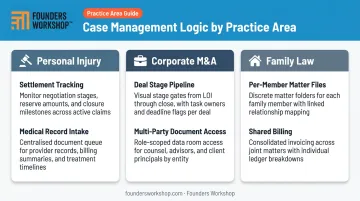
Off-the-shelf tools rarely accommodate these differences. They require fundamentally different system logic.
Document Management and Automation
Document volume, versioning, confidentiality requirements, court-specific formatting, and e-signature workflows create a document management challenge unlike anything in most industries.
Custom document systems handle:
- Secure storage with granular access permissions
- Fast search using metadata tagging
- Version control with full audit trails
- Client portal access with configurable visibility
- Direct integration with e-signature platforms
The goal is reducing the hours attorneys spend hunting for the right version of the right document. Those are billable hours.
Billing, Time Tracking, and Trust Accounting
Legal billing logic is complex. LEDES formatting for corporate e-billing, IOLTA trust account compliance, contingency fee calculations, multi-matter client billing, and jurisdiction-specific rate structures all require tailored logic that generic accounting software doesn't natively provide.
Custom billing software can:
- Capture time automatically from active work sessions
- Enforce billing rules by matter type or client agreement
- Generate LEDES-compliant invoices for corporate clients
- Maintain trust account segregation per ABA Model Rule 1.15
- Integrate with QuickBooks or other accounting platforms
Fewer write-offs, fewer billing errors, and faster collection cycles follow naturally from eliminating manual workarounds.
Client Intake and Legal CRM
First impressions are set during intake. Custom intake workflows digitize the entire onboarding process:
- Web-based forms that auto-populate matter files
- Automated conflict-of-interest checks
- Engagement letter generation
- A legal CRM tracking every touchpoint from initial inquiry through matter close
This is where firms can differentiate the client experience in ways no standard SaaS platform allows.
Compliance and Risk Management Tools
For larger firms and in-house legal departments, custom compliance software monitors regulatory requirements across jurisdictions, maintains searchable audit trails, enforces internal policy rules, and flags potential ethical conflicts before they become problems.
Thomson Reuters' 2025 Legal Department Operations Index reports that 73% of legal department professionals plan to use advanced technology to automate legal tasks and reduce costs — and compliance monitoring is near the top of that list.
Off-the-Shelf vs. Custom Legal Software: How to Decide
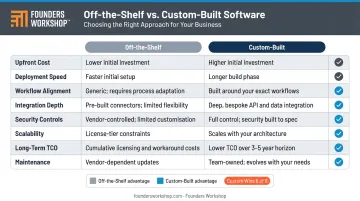
The right choice comes down to how closely your workflows match what a SaaS product is built to handle — and how much that gap costs you over time.
| Criteria | Off-the-Shelf | Custom-Built |
|---|---|---|
| Upfront cost | Lower | Higher |
| Deployment speed | Weeks | Months |
| Workflow alignment | Generic | Exact match |
| Integration depth | Limited/standard | Purpose-designed APIs |
| Security controls | Vendor-defined | Client-specified |
| Scalability | Platform-constrained | Modular expansion |
| Long-term TCO | Recurring licenses + workarounds | Higher upfront, lower over time |
| Maintenance | Vendor-managed | Development partner |
When Custom Becomes the Smarter Investment
Custom development makes sense when:
- Your practice area has workflows no SaaS tool accommodates
- Data security requirements exceed what a shared SaaS environment can provide
- Multiple disconnected tools are creating duplicate entry and data inconsistency
- You're a LegalTech entrepreneur building a product for the broader market
The decision isn't always binary. A phased approach often works well: build a custom MVP for the highest-priority workflow first, test it in production, then expand from there. At Founders Workshop, that's the starting point for most new engagements — the 5D Process begins with a Discovery phase that scopes the most valuable functionality before writing a line of code.
How AI Is Changing What Law Firms Can Build
AI adoption in legal practice is moving fast. Wolters Kluwer's 2026 Future Ready Lawyer Survey reports that 92% of legal professionals now use at least one AI tool in their daily workflow, and 62% report saving 6–20% of their weekly time through AI usage.
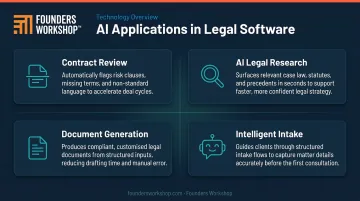
Practical AI Applications in Legal Software Today
- Contract review and clause extraction: AI models trained on legal documents identify non-standard clauses, flag missing provisions, and summarize contract risk faster than manual review.
- AI-assisted legal research: Intelligent search surfaces relevant case law, statutes, and secondary sources based on matter context, cutting research time on standard questions.
- Automated document generation: Custom templates connected to matter data produce first drafts of standard agreements, pleadings, or correspondence with minimal attorney input. The attorney reviews; the AI assembles.
- Intelligent client intake: Conversational AI handles initial intake questions, qualifies leads, detects urgency, and routes matters to the right practice group before a human ever reads the submission.
AI Requires Guardrails, Not Just Features
ABA Formal Opinion 512 (July 2024) requires attorneys using generative AI to:
- Evaluate disclosure risks before entering client information
- Ensure supervision over AI-generated work product
- Maintain competence in understanding the tools they use
Custom-built AI features let firms embed these obligations directly into the workflow: mandatory attorney review steps, auditability of AI-generated content, and access controls that keep client data away from unauthorized external tools. That level of control is difficult to achieve with off-the-shelf AI products.
How to Choose the Right Law Firm Software Development Partner
The quality of the development partner matters as much as the technology decisions. A firm that builds the wrong features, or builds the right features without understanding compliance requirements, creates problems that are expensive to fix.
What to Look For
A reliable development partner for legal software should demonstrate:
- Experience in regulated industries (healthcare, financial services, or legal)
- A structured discovery process that maps workflows before development begins
- Incremental delivery so the firm can validate and adjust as modules are built
- Post-launch support that accommodates workflow and compliance changes over time
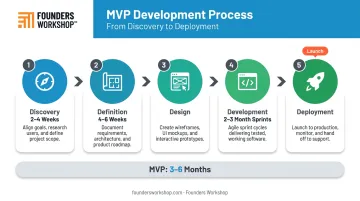
Founders Workshop's 5D Process is built around these criteria. The Discovery phase (2–4 weeks) maps goals, user needs, integration requirements, and technical constraints before any prototype is designed. The Definition phase (4–6 weeks) produces a clickable prototype and an actionable roadmap.
Development follows in 2–3 month sprints. For most projects, this moves an MVP from Discovery to Deployment in 3–6 months — with the firm using core functionality while additional modules are still in progress.
The Cost Reality of Custom Development
Custom development costs vary significantly with scope and team location. A focused module — custom billing or intake — can start in the low five figures. A full-featured practice management platform with multiple integrations runs considerably higher.
Nearshore development teams change the math. Founders Workshop's Latin American development team delivers senior engineering talent at roughly one-third the cost of U.S.-based teams, while maintaining full timezone overlap and working in English. This makes custom development accessible for mid-size firms and LegalTech startups that would otherwise price themselves out before they start.
Questions to Ask Any Prospective Development Partner
Before signing an engagement, ask:
- Do you have experience building software for regulated industries?
- How do you handle security requirements — encryption, access controls, hosting standards?
- What does your discovery and scoping process look like before development starts?
- How do you deliver incrementally so we can validate early?
- What does post-launch support and compliance update management look like?
A partner who can answer these questions in detail — not in generalities — understands what legal software actually requires.
Frequently Asked Questions
What software do most law firms use?
Most firms use a combination of practice management software for cases and billing, legal research platforms, and document management tools. The ABA's 2024 survey found Clio holds roughly 15% adoption among firms using practice management platforms. Firms with specialized workflows increasingly move beyond these standard tools toward custom-built solutions.
How much does custom law firm software development cost?
Costs vary with complexity — a focused module like custom billing or client intake can start in the low five figures, while a full-featured platform with multiple integrations runs considerably higher. Nearshore development teams, like those Founders Workshop operates across Latin America, can reduce costs to roughly one-third of U.S.-only team rates.
How long does it take to build custom legal software?
A scoped MVP with core functionality typically takes 3–6 months from Discovery through Deployment. Full-featured platforms with multiple integrations can take 6–12 months. Phased delivery allows firms to begin using core modules while additional features are still in development.
Should my law firm build custom software or buy off-the-shelf?
Off-the-shelf tools work well for standard workflows and smaller firms with limited budgets. Custom development makes more sense when workflows are unique, security requirements are strict, or disconnected tools are creating operational drag and duplicate data entry across your team.
Can custom legal software integrate with tools my firm already uses?
Yes. Custom software is built with purpose-designed API integrations to connect accounting platforms, court e-filing systems, cloud storage, e-signature tools, and communication platforms. Data stays consistent across systems without manual duplicate entry.
What security standards should law firm software meet?
Legal software should incorporate end-to-end encryption for data at rest and in transit, role-based access controls, and hosting in SOC 2 or ISO 27001 certified environments. Custom development also lets firms specify data residency and access policies directly, something shared SaaS environments typically cannot offer.