

The most reliable EHR integration doesn’t start with an API. It starts with knowing who needs which information, where that data belongs, and how it supports care. When clinical and administrative details sit in disconnected systems, staff may have to re-enter information or work from inconsistent records. The right EHR and EMR integration solutions connect systems around real workflows, rather than adding technical complexity for its own sake.
Interoperability, security, and system compatibility all matter, but a sound plan also protects clinical workflows and makes clear who owns the data and the integration over time. This guide explains how to compare integration approaches, set a practical scope, and plan phased implementation with clear ownership, testing, and ongoing maintenance. Use it to identify the connections your organization needs and keep the people who use them at the center of the work.
Key Takeaways
- Understand how EHR and EMR integration solutions connect healthcare applications, and how the two record types differ.
- Trace information from its source through mapping, exchange, validation, and monitoring, while clarifying which system owns each data element.
- Compare APIs, standards-based exchange, interface engines, and custom middleware by fit, extensibility, and operational needs.
- Plan for security, data quality, stakeholder ownership, and measurable success before development begins.
- Use a phased delivery process to move from workflow discovery and testing to launch and ongoing improvement.
What EHR and EMR Integration Solutions Connect, and Why It Matters
EHR and EMR integration is the coordinated exchange of information between electronic record systems and other healthcare applications, so data can support connected operational and clinical workflows. EHR and EMR integration solutions can connect records with scheduling, billing, referral, or patient-facing applications. The goal is to make relevant information available where work happens, which can reduce duplicate entry and information silos. Integration alone doesn’t guarantee complete records or friction-free workflows. Results depend on how systems connect and how information is managed.
EHR and EMR: What the Terms Mean in an Integration Project
An electronic medical record (EMR) generally refers to a digital chart used within a particular practice or organization. An electronic health record (EHR) is designed to provide a broader view of a person’s health information across care settings. The terms are related, but their scope and intended use can differ. The Electronic Health Record (EHR) overview provides helpful background on the concept and its relationship to medical records.
For an integration project, the label alone doesn’t tell you what should connect. A single clinic may need information to move between its record system and billing application, while a larger organization may coordinate data across multiple teams or services. Begin by listing the systems involved, the information each holds, and the staff who rely on it.
Integration connects systems that remain in use. It isn’t the same as replacing a record platform or migrating historical data to a new one. Those initiatives may overlap, but they have different scopes and planning needs. Defining the distinction early helps prevent a request for a specific connection from turning into an unnecessary platform replacement project.
Which Healthcare Workflows Benefit From Connected Systems?
Connections matter wherever information passes from one task or team to another. Consider a referral: staff may need to coordinate the referral details, appointment scheduling, and relevant patient information. If those steps depend on disconnected applications, people may have to enter or retrieve the same details more than once. A billing handoff can create a similar challenge when administrative staff need information recorded elsewhere.
- Referrals: Help teams coordinate referral details with the next step in care.
- Scheduling: Connect appointment workflows with the information staff need to manage visits.
- Billing: Support the handoff of relevant information between clinical and administrative work.
- Patient-facing services: Link patient interactions with the records or services that support them.
Clinicians need information that fits the care workflow; administrators need dependable operational handoffs; patients may experience the results through scheduling or other services. For a Dallas-Fort Worth healthcare organization, start by identifying which handoffs create friction today, rather than selecting a connection because it sounds advanced. That workflow-first perspective also helps teams assess broader healthcare technology solutions in context.
How EHR and EMR Integration Moves Data Through Clinical Workflows
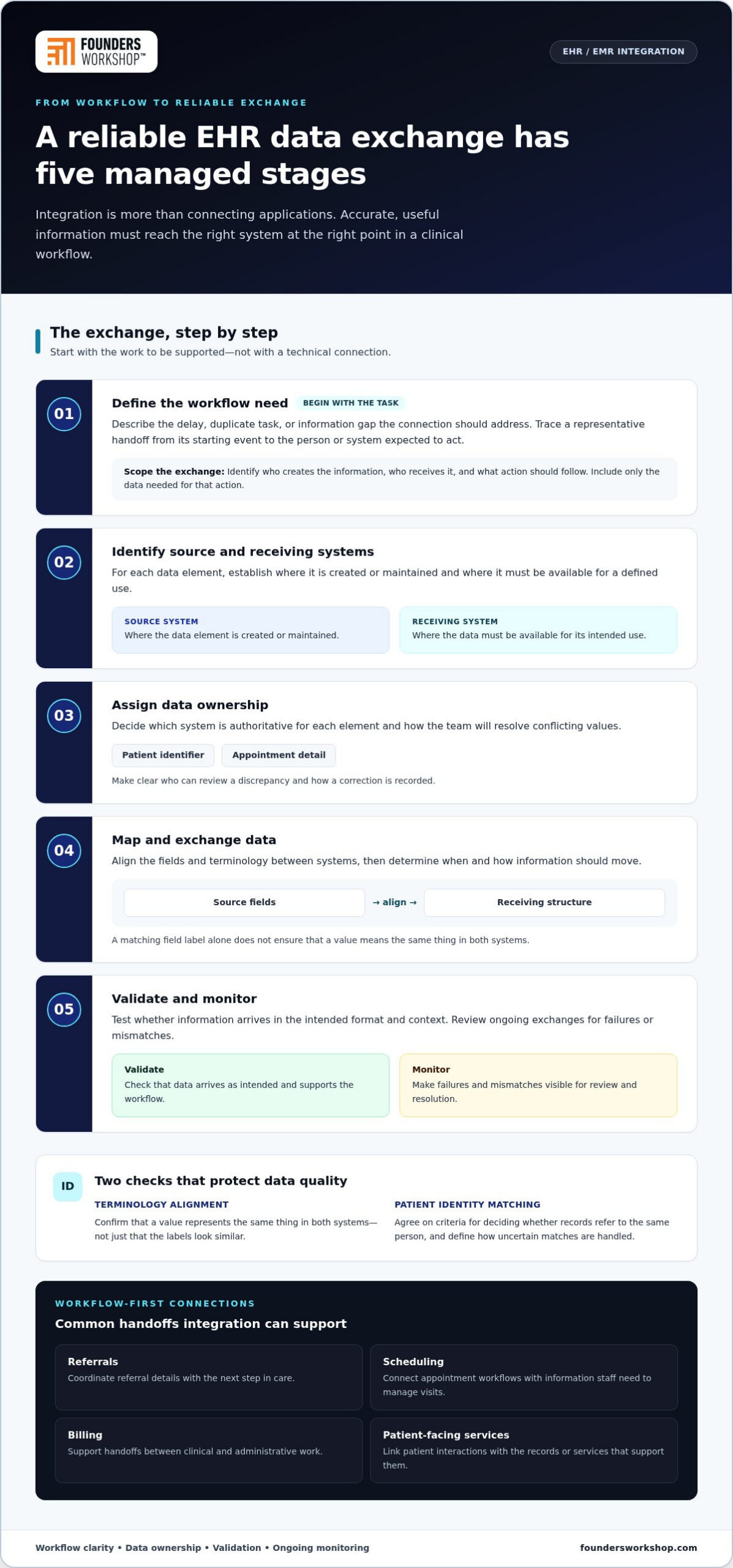
Reliable integration is a managed sequence, not simply a connection between two applications. Integration quality depends on whether accurate, useful data reaches the right system at the right point in a clinical workflow. Before choosing a technical pattern, understand the work the exchange will support, where each data element originates, and who is responsible when information doesn’t match.
Map the Workflow Before Defining the Data Exchange
Trace a representative handoff from its starting event to the person or system expected to act on it. For example, follow a clinician’s request for a service through the steps and information staff need to coordinate what happens next. Identify who creates the information, who receives it, and what action should follow. Include only the data needed for that action, rather than moving every available field by default.
- Define the workflow need. Describe the delay, duplicate task, or information gap the connection should address.
- Identify source and receiving systems. The source is where a data element is created or maintained; the receiving system is where it must be available for a defined use.
- Assign data ownership. Decide which system is authoritative for each element, such as a patient identifier or appointment detail, and how the team will resolve conflicts.
- Map and exchange data. Align fields and terminology, then select when and how the information should move.
- Validate and monitor. Test whether information arrives in the intended format and context, then review ongoing exchanges for failures or mismatches.
Data Mapping, Identity, and Error Handling
Mapping translates one system’s fields into the receiving system’s structure. Terminology alignment helps ensure a value represents the same thing in both systems, rather than merely sharing a similar label. Patient identity matching is just as important: teams need agreed criteria for determining whether records refer to the same person, along with a process for handling uncertain matches.
Ownership rules make disagreements manageable. If two systems contain different values, staff should know which source governs that element, who can review the discrepancy, and how a correction is recorded. An error queue or similar visible work process can surface failed exchanges, but it helps only when someone is accountable for reviewing and resolving them. Assign that responsibility before launch and define how unresolved issues will be escalated.
The exchange pattern should fit the workflow. Event-driven exchange sends information in response to a defined event; scheduled exchange moves data at planned intervals; and user-triggered exchange begins when a person requests or initiates it. A time-sensitive handoff may need a different pattern from a periodic administrative update. Each option affects timing, oversight, and what users should expect when data isn’t immediately available. HealthIT.gov offers resources on health information technology and interoperability that can help teams understand the broader exchange environment.
Compare EHR and EMR Integration Approaches Before Choosing an Architecture
There’s no single architecture for every healthcare workflow. The right choice depends on which systems exchange information, how often it must move, what transformations are needed, and who will maintain the connection. Compare approaches against these operational needs before treating integration as a reason to replace or select a broader record system. Architecture determines how systems communicate; it doesn’t determine which record platform an organization should use.
| Approach | Potential fit | Coordination needs | Extensibility and oversight |
|---|---|---|---|
| APIs | Exchanging defined information between applications. | Agree on available data, access, and how each workflow uses it. | Can support application-to-application connections; teams still need to monitor access and changes. |
| Standards-based exchange | Structuring data exchange around shared formats or messaging conventions. | Map local fields and workflows to the selected standard. | Can provide a common basis for exchange, but requires ongoing mapping and operational ownership. |
| Interface engine | Coordinating exchanges across multiple connected systems. | Define routing, transformations, and responsibility for each interface. | Can centralize integration logic; the engine and its connections need active oversight. |
| Custom middleware | Handling project-specific transformation or orchestration needs. | Specify the required behavior and system boundaries clearly. | Can be tailored to a workflow, with maintainability relying on documentation and clear ownership. |
APIs, HL7 FHIR, and HL7 v2
An API is a defined way for software systems to request or exchange information. HL7 FHIR is a healthcare data exchange standard commonly used with APIs, while HL7 v2 is a messaging standard used for many internal clinical exchanges, such as lab results and admission, discharge, or transfer notifications. They serve different roles and can coexist. A standard helps structure an exchange, but it doesn’t determine which fields matter, how local terminology maps, or when data should move.
In practice, a healthcare organization may need to connect a FHIR API with an existing HL7 v2 workflow. That may require translation between formats and careful testing of each message’s meaning and timing. Evaluate the actual interfaces and workflow requirements rather than assuming that adopting a standard makes systems automatically compatible. This is another reason to keep integration architecture separate from a platform replacement decision.
Interface Engines and Custom Middleware
An interface engine can coordinate exchanges among systems by applying routing or transformation rules as information moves. Custom middleware may suit project-specific orchestration that doesn’t fit a simpler connection. Either approach needs named owners for updates, issue resolution, documentation, and monitoring. Teams developing HIPAA-compliant applications should also address privacy and security throughout the architecture, rather than treating them as tasks to add after the exchange is built.
For a Dallas-Fort Worth organization, the practical question is which approach fits the workflow and can be operated responsibly over time. EHR and EMR integration solutions may combine approaches, such as using an engine to coordinate different types of interfaces. Make that decision with the people who will use and maintain the connection.
Plan an EHR Integration With Security, Data Quality, and Testing in View
A dependable plan defines what the integration will do, how teams will know it’s working, and who will manage it after launch. Treat privacy, security, and data quality as design considerations from the outset. This is project-planning guidance, not legal advice; appropriate safeguards depend on the systems, information, and workflows involved.
Define Scope, Ownership, and Success Measures
Set clear boundaries before development begins. Name the systems and workflows in scope, specify which data elements will move, and assign a business owner who can make decisions about each workflow. Include clinical, administrative, technical, and security perspectives so the plan reflects both daily operations and system responsibilities.
- Scope: Record the source and receiving systems, the workflow covered, and what the project will leave out.
- Ownership: Identify who approves data definitions, resolves conflicting information, and coordinates changes.
- Success measures: Choose indicators tied to the project, such as whether required information arrives in the expected format or how often staff must correct a handoff.
- Security design: Define who needs access to which information, how access will be managed, and how sensitive data will be protected as it moves between systems and within the integration.
Choose measures that reflect the intended operational change. A patient-facing workflow, for example, may need different measures from an internal administrative exchange. If the project includes a patient portal, define which information and tasks it must support and how those interactions connect to the workflow behind the scenes.
Test in Stages and Prepare for Ongoing Support
Testing should involve people who understand the work, not just the technical team. Start with representative scenarios, then add cases that expose exceptions: incomplete information, a record that can’t be matched confidently, conflicting values, or an exchange that fails. Confirm what users should see and do in each situation before rollout.
- Validate the data. Check that mapped fields arrive in the right place and retain their intended meaning.
- Review errors and recovery. Confirm that failures are visible, assigned for resolution, and handled without silent data loss or confusing duplicate work.
- Check access. Test that the planned permissions support the workflow without granting unnecessary access.
- Gather user feedback. Have clinicians and administrative staff exercise the process and report friction before launch.
- Plan support. Document who monitors the exchange, handles issues, coordinates changes, and reviews performance after release.
Ongoing monitoring helps teams spot data issues and respond as workflows change, turning a working integration into a dependable operation. A phased approach gives teams planning EHR and EMR integration solutions a chance to learn from testing before expanding scope.
Choose an EHR Integration Partner and Move From Plan to Delivery
A delivery partner helps turn an integration goal into a project with clear scope, decisions, and ownership. Evaluate how the team works with clinical, operational, and technical stakeholders, not just how it describes the technology. Early discussions should make clear what will be built, how decisions will be recorded, and who will be accountable at each stage.
Questions That Clarify Project Fit and Delivery
Ask specific questions to understand whether the proposed approach fits the organization’s workflow and capacity to support it over time. Look for answers that connect technical choices to operational needs.
- How will clinical, operational, and technical stakeholders contribute to discovery and scope decisions?
- How will the team document architecture choices, system boundaries, and ownership of key data?
- What will testing cover, including routine workflows, exceptions, and failed exchanges?
- How will launch coordination account for staff readiness and the effect of changes on daily work?
- Who will manage support, maintenance, and future changes after the initial release?
Clear communication matters throughout delivery. A project needs a shared way to track decisions, surface risks, and assign follow-up actions. That discipline helps keep clinical workflow questions from being treated as technical details alone, and prevents technical constraints from appearing late in the process.
A Phased Path From Integration Need to Working Solution
Begin with one defined workflow and its business rationale. A focused first release gives the team a practical way to validate assumptions before expanding scope. Leave room for future connections, but make each phase serve a clear operational purpose.
- Discover and align. Confirm the workflow, affected users, systems, and intended result with the people closest to the work.
- Define the first release. Set boundaries for the data and exchange, document ownership, and agree on how the team will judge whether the release is useful.
- Build and review. Develop the agreed connection and keep stakeholders informed as decisions or constraints emerge.
- Test and prepare. Validate representative workflows, review exceptions, and coordinate readiness with the teams who will use the process.
- Launch and iterate. Monitor how the release performs, address issues through agreed ownership, and use what the team learns to guide the next phase.
Founders Workshop is a Dallas-based team that provides healthcare technology development and system integrations. For healthcare organizations in Dallas, Fort Worth, Plano, Frisco, Irving, and across Texas, the work can begin with the workflow that needs attention, the systems involved, and the operational result you want to support.
Make Your Next Integration Step Deliberate
Turn the integration goal into a decision your team can act on: identify the workflow that matters most, name the people who can shape it, and agree on what a better handoff would look like. That shared starting point gives technical planning a clear purpose and keeps future changes connected to operational priorities.
EHR and EMR integration solutions can help an organization adapt as its needs change when the people responsible for the work remain involved after launch. Founders Workshop’s leadership team brings more than 30 years of experience to healthcare technology and integration work.
Frequently Asked Questions
Is EHR integration the same as EHR data migration?
No. Integration lets systems exchange information while they continue operating; migration moves data from one system or storage environment to another. A clinic might integrate its existing EHR with a scheduling application without transferring historical charts. If a project includes both, treat them as related but distinct workstreams, with separate scopes, validation criteria, and decisions about how migrated records will be checked and made available.
Can an EHR integration connect systems from multiple vendors?
Yes, systems from different vendors can be connected when the required interfaces and data exchange are workable. Teams need to assess what each system can send or receive, how information should be translated, and how mismatches will be handled. A healthcare group with locations in Dallas, Fort Worth, Plano, Frisco, or Irving may use different applications across teams, so mapping the actual workflows helps define a practical integration scope.
Does HL7 FHIR replace HL7 v2?
No. HL7 FHIR and HL7 v2 are distinct approaches that can serve different exchange needs, and a healthcare environment may use both. For example, a system might expose information through a FHIR API while another established workflow exchanges messages using HL7 v2. Rather than assuming one standard replaces the other, identify the systems and workflows involved, then plan any translation and validation the connection requires.
What happens to information when an integration connection is temporarily unavailable?
It depends on how the connection is designed. Information might be delayed, rejected, or held for later processing, so teams should define the expected behavior before relying on the exchange. Specify how staff will recognize an interruption, how pending or failed items will be reconciled after service resumes, and how duplicate actions will be prevented. Test a realistic outage scenario with the people responsible for the affected workflow.
Can an organization integrate an EHR without replacing its existing systems?
Yes. Integration can connect an existing EHR with other applications while the organization keeps its current platforms. For instance, a practice may connect its record system to a separate scheduling or billing application to support a specific handoff. Start by identifying the operational gap and the systems involved; replacement is a separate decision that may involve broader data, workflow, and change-management considerations.
How should teams handle historical records when connecting EHR and EMR systems?
First decide whether the workflow needs historical records or only information created from a defined point forward. If older records must be available, determine which record types and time periods matter, how they’ll be matched to the correct patient, and how users will distinguish historical information from current updates. Test representative records, including incomplete or inconsistent entries, before making them part of routine workflows.
Can EHR integration support a custom patient portal?
Yes. An integration can connect a custom patient portal with an EHR so the portal can support selected patient-facing workflows. Define what patients should be able to view or do, which system is authoritative for each item, and how updates should be handled. For example, an appointment-related interaction may require information to pass between the portal and scheduling workflow. Design the connection around the intended patient experience and data safeguards.
Ready to discuss your healthcare integration goals? Contact Founders Workshop for a consultation.