

What if an application’s biggest HIPAA risk isn’t a missing security feature, but a workflow nobody considered? HIPAA compliant application development starts with understanding whether the app handles protected health information, who can access it, and how data moves between people, systems, and vendors. Encryption and a vendor’s assurances can help, but neither alone establishes compliance.
Technical safeguards matter, but an application sits within a broader compliance program. Responsibilities may span your organization, development team, cloud providers, and other business associates. Before development begins, map who owns each decision and what the application needs to support. After launch, keep those responsibilities current as workflows and systems change.
This guide offers a practical checklist for assessing your application’s role, planning privacy and security into its design, and establishing the people and processes needed to support it. You’ll consider business workflows alongside technical decisions, from defining data access to maintaining the application over time. For healthcare organizations in Texas and across the United States, a Dallas-based development partner can help translate those priorities into a plan for building and evolving the software.
Key Takeaways
- Compare custom development, platform configuration, and system integration by workflow fit, flexibility, ownership, and ongoing maintenance.
- Use a project checklist to turn planning, design, build, verification, and launch into clear decision gates with useful artifacts.
- HIPAA compliant application development works best when privacy, security, and business workflows shape technical decisions from the start.
- Plan how the application will be maintained and reviewed after launch, not just how it will be built.
- Align product strategy, integrations, and technical execution with a development partner to support your organization’s healthcare workflows.
HIPAA-Compliant Application Development Starts With the Data and Workflow
HIPAA compliant application development means building and operating software as part of an organization’s broader compliance program, not treating compliance as a feature to switch on at launch. Before choosing an architecture or writing code, establish what information the application handles, where it goes, and which people or organizations interact with it. The Health Insurance Portability and Accountability Act (HIPAA) includes rules concerning health information, but how those rules apply depends on the organization and its activities.
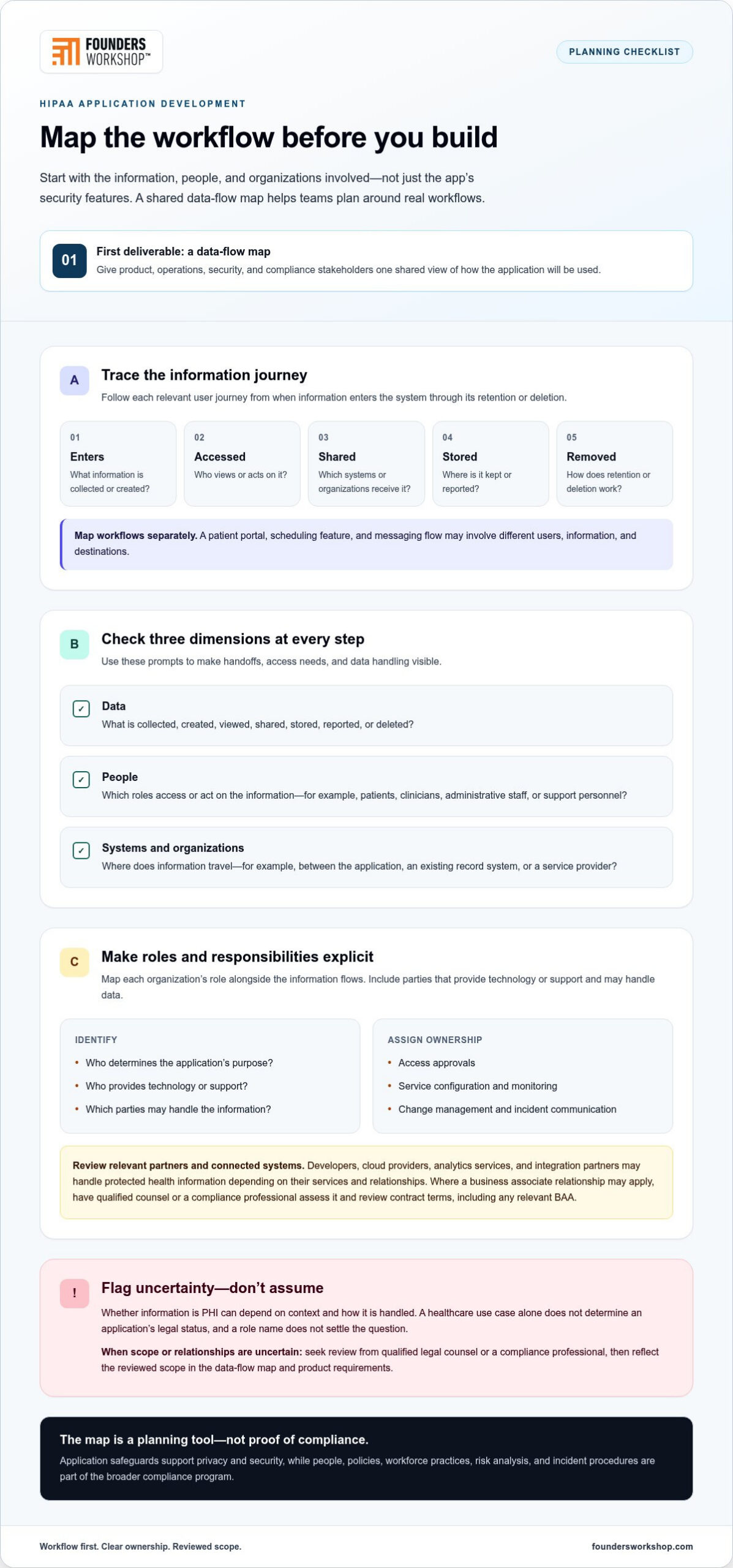
A useful first deliverable is a data-flow map. It gives product, operations, security, and compliance stakeholders a shared view of how the application will be used, including handoffs that can be easy to overlook. Use it to identify where information enters, which systems receive it, and who needs access at each step.
Which application workflows may involve protected health information?
Trace information through each relevant user journey, from the moment it enters the system to its eventual retention or deletion. A custom patient portal, for example, might collect a patient’s details, let authorized staff access them, send information to another system, and display it in a report. Scheduling and messaging may involve different users, information, and destinations, so map those flows separately rather than assuming every feature handles data in the same way.
For every step, record:
- Data: What is collected, created, viewed, shared, stored, reported, or deleted?
- People: Which user roles access or act on the information, including patients, clinicians, administrative staff, and support personnel where relevant?
- Systems and organizations: Where does the information travel, such as between the application, an existing record system, or a service provider?
Don’t assume that every health-related field is PHI, or that a data element falls outside HIPAA simply because it appears in a familiar workflow. Classification can depend on context and how information is handled. Flag uncertain cases for qualified legal counsel or a compliance professional, then reflect the reviewed scope in the data-flow map and product requirements.
When can HIPAA apply to an application or its partners?
At a high level, HIPAA rules apply to covered entities, such as certain healthcare providers, health plans, and healthcare clearinghouses. Business associates may also be subject to relevant requirements when they perform certain services involving protected health information on behalf of a covered entity or another business associate. A healthcare use case alone doesn’t determine an application’s legal status, and a company’s role name doesn’t settle the question.
Map each organization’s role alongside each information flow. Identify who determines the application’s purpose, who provides technology or support, and which parties may handle the data. Have qualified counsel or a compliance professional review specific interpretations and relationships before finalizing the scope. This groundwork helps the team plan around actual workflows instead of assumptions. For a broader look at healthcare software needs, explore this healthcare technology solutions guide.
Compliance depends on people, processes, and technology working together. Safeguards are effective only when real workflows and clear responsibilities support them.
HIPAA Responsibilities Extend Beyond the Application’s Security Features
A secure application is not, by itself, proof that an organization complies with HIPAA. Encryption, access controls, and secure hosting can support privacy and security, but they don’t establish the policies, workforce practices, risk analysis, and incident procedures needed to manage information across the organization. A vendor’s promise cannot replace a clear understanding of how the software is used and who is accountable for it.
Application security controls protect a system; organization-wide compliance depends on how people, policies, vendors, and processes govern that system. That distinction should shape project planning. The healthcare organization sets its operational expectations, the application team implements agreed requirements, and service providers manage the parts they control. Assign an owner and supporting parties to each responsibility so teams don’t assume someone else is handling a risk.
How do business associates and service providers fit into development?
A developer, cloud provider, analytics service, or integration partner may handle protected health information on behalf of a covered entity, depending on the services provided and the relationship. If a business associate relationship applies, the parties may need a business associate agreement (BAA) that addresses relevant responsibilities. Have qualified counsel or a compliance professional assess the relationship and review contract terms rather than relying on a vendor’s general assurances.
Make responsibilities visible. Document who approves access, configures and monitors each service, manages changes, and communicates about incidents. Include subcontractors and connected systems in that review where relevant. A responsibility matrix can name the accountable organization and supporting party for each task, helping surface operational gaps before launch.
What should the security and privacy plan cover?
Build the plan around the application’s intended use and the risks identified by the organization. For each safeguard, specify an owner, the process it supports, and how the organization will review whether it remains effective. Connect technical decisions to actual workflows instead of relying on a generic checklist or a provider’s description of its service.
- Access management: Define role-based permissions, how access is approved, and how it is changed or removed when responsibilities change.
- Auditability: Determine what activity needs to be recorded, who reviews relevant records, and how findings are handled.
- Data protection and recovery: Document how information is protected in the application and how backups and restoration fit the organization’s continuity plans.
- Secure operations: Set expectations for changes, maintenance, vulnerability handling, and communication when a security concern arises.
- Workforce and incident processes: Align staff guidance, escalation paths, and response procedures with the application’s use and organizational policies.
These safeguards need ongoing ownership. For HIPAA compliant application development, the organization and its development partners should translate documented risks into requirements, verify those requirements during delivery, and keep responsibilities clear as the system evolves. Founders Workshop helps Texas healthcare teams connect workflows, integrations, and technical execution through a collaborative application development partnership.
Compare HIPAA Application Development Approaches Before Choosing a Path
No single development path is automatically safer or more suitable for every healthcare organization. Custom software offers control over product decisions, but it also creates systems your team must maintain. Configuring an existing platform can reduce the need to build from scratch, while integrations can connect systems already in use. Assess every approach against your workflows, data flows, risks, and capacity to operate and maintain the result.
Use this comparison to frame the decision. The “ownership” column refers to responsibility for product direction and ongoing decisions, not a legal determination of who owns data.
| Approach | Fit and workflow flexibility | Integration needs | Ownership and maintenance |
|---|---|---|---|
| Custom development | Useful when workflows are differentiated or existing tools don’t support important user needs. Flexibility is high, but requirements must be defined and tested. | Designed around required connections, which may still involve complex work with existing systems. | Offers greater control over product direction. The organization needs a plan and capacity for ongoing maintenance. |
| Platform configuration | Can fit when an established platform supports the required workflows with suitable controls. Flexibility depends on the platform’s available settings. | May need connections to records, scheduling, or other systems, depending on the intended use. | Decisions are shaped by the platform’s capabilities and release approach. Ongoing administration and review remain important. |
| System integration | Can connect established applications rather than replace them. The user experience depends on how well the connected workflows fit together. | Integration is the central requirement. Map how information moves, where it is transformed, and how errors are handled. | Responsibility spans the connected systems and their operators. Changes to one system may affect the wider workflow. |
When might custom development fit a healthcare workflow?
Custom patient portal development may make sense when a specific workflow is central to the product or cannot be supported well through configuration. For example, a Texas provider organization might need a tailored process that connects intake, staff review, and follow-up. Before committing, weigh that user need against product scope, integration complexity, maintenance capacity, and planned growth. Customization creates choices, and those choices require long-term ownership.
When might configuration or integration be the better fit?
Configuration can be practical when established software already supports the workflow and can be set up to align with documented requirements. Integration may be preferable when teams need existing systems to work together without rebuilding their core functions. In either case, examine data movement, user experience, operational dependencies, and the work needed to maintain connections as systems change. Treat vendor representations as useful inputs, not as a substitute for your organization’s assessment.
The best path may combine approaches. A focused application could use custom features for a distinctive workflow while relying on established systems for other functions. For HIPAA compliant application development, compare options against the real operating model, then choose an approach your organization can govern and sustain, not simply the one that looks fastest to build.
Use This HIPAA Application Development Checklist From Planning Through Launch
A useful project checklist turns broad privacy and security goals into decisions the team can document, test, and revisit. Each gate below produces an artifact that helps business owners, product leads, developers, and compliance stakeholders stay aligned. Treat the sequence as a working process, not a one-time approval exercise.
What should teams define before development begins?
Agree on intended users, workflows, information types, integrations, and business objectives. Identify system boundaries, access roles, and partner responsibilities, then have appropriate stakeholders review uncertain compliance interpretations. Translate assessed risks into specific requirements and acceptance criteria. This gives the team a clear way to verify whether the design and implementation meet the agreed needs.
What should teams verify before and after launch?
Plan verification before release. Include security testing, access checks, logging review, and a process for tracking and resolving issues. Before launch, document who owns release decisions, incident escalation, backup responsibilities, and routine maintenance. After launch, revisit assumptions whenever features, vendors, integrations, or workflows change.
- Discovery: Confirm the business goals, user roles, intended workflows, information types, and connected systems. Project artifact: an approved scope and workflow map.
- Design: Define system boundaries, access roles, key data movements, and partner responsibilities. Connect identified risks to design choices and requirements. Project artifact: a data-flow diagram and access model reviewed by relevant stakeholders.
- Build: Implement the agreed requirements and record important design decisions. Review changes against the intended use and requirements as work progresses, rather than waiting until development is complete. Project artifact: a traceable set of requirements linked to implementation decisions.
- Verification: Test expected user access, review logging behavior, conduct planned security testing, and track issues through resolution. Confirm that test scenarios reflect actual workflows. Project artifact: test results and an issue log with owners and disposition.
- Launch: Confirm release approval, operational ownership, escalation paths, backup responsibilities, and maintenance routines. Project artifact: a launch record and operational handoff.
- Ongoing review: Reassess the application when its features, integrations, vendors, or use change, and track follow-up work. Project artifact: a change and review log that captures decisions and assigned actions.
Compliance-oriented development requires continuing operational ownership, because an application’s risks and responsibilities can change after launch. For HIPAA compliant application development, keep privacy and security review connected to delivery and day-to-day operations, with qualified compliance or legal input where interpretation is needed.
If your team is turning these project gates into a delivery plan, talk with Founders Workshop about healthcare application development.
Build a HIPAA-Ready Application With a Dallas-Based Development Partner
Turning a healthcare product idea into a dependable application takes more than technical execution. Business priorities, user needs, integrations, and operational realities need to inform one another from the start. Founders Workshop is a Dallas-based software development partner for Texas healthcare organizations and clients across the United States. The team brings product planning and software delivery together, translating organizational goals into a practical path for building and evolving healthcare technology. This work supports your organization’s compliance program; it doesn’t replace qualified compliance or legal review.
What should a productive application planning conversation cover?
Begin with the business outcome. Is the application intended to improve a patient-facing workflow, support staff operations, or connect capabilities across existing systems? Then make the everyday experience concrete: who will use it, what steps they need to complete, where handoffs occur, and which workflow constraints shape the design.
A useful planning discussion also clarifies:
- Existing systems: Which platforms must connect, and what should each system contribute to the experience?
- Information flows: Where information enters, moves, and is used, with appropriate stakeholders involved in reviewing its treatment.
- Priorities: Which outcomes are essential for an initial release, and which can be addressed as the product develops?
- Decision ownership: Who guides product choices, provides operational context, and makes compliance-related decisions within the organization?
These conversations help keep user workflows and technical architecture aligned. They also make trade-offs visible early, before a feature decision adds unnecessary complexity or makes the product harder to maintain.
How can development stay aligned as the product evolves?
Healthcare applications change as organizations refine processes, add integrations, and respond to new business needs. A roadmap should make those changes manageable. For each proposed feature or connection, consider how it affects user workflows, system dependencies, data movement, and previously assessed risks. Bring operational stakeholders into roadmap discussions so technical priorities reflect how the application is used in practice.
Alignment continues after initial delivery. Plan who will maintain the software, review proposed changes, and coordinate work across connected systems. Keep decisions and assumptions visible so new team members and stakeholders can understand why the product works as it does. Founders Workshop’s leadership team brings over 30 years of experience, grounding development conversations in practical business goals as well as technical execution.
A well-planned partnership can connect product strategy, workflow design, system integrations, and ongoing development. If you’re planning a healthcare application or considering how an existing product should evolve, contact Founders Workshop for a consultation.
Turn Your Application Plan Into a Clear Next Step
Turn your priorities into a practical product plan by identifying the decision your team needs to make first. That might mean clarifying a workflow, selecting an application approach, or defining how an integration should support users. Bring the right business, operational, and technical stakeholders into the conversation so product choices reflect how the application will work in practice.
Strong HIPAA compliant application development is an ongoing commitment, not a finish line. A thoughtful plan helps your team move forward with clearer requirements, better alignment, and a shared understanding of what needs continued attention as the product grows. Keep the focus on software that supports real healthcare work and can evolve with your organization.
Discuss your healthcare application plans with Founders Workshop and take a confident next step toward development.
Frequently Asked Questions
Is a HIPAA-compliant application enough to make a healthcare organization HIPAA compliant?
No. An application can support an organization’s compliance efforts, but it can’t establish that the organization’s policies, staff practices, and service relationships are appropriate. For example, a well-protected scheduling feature won’t address how staff should handle a misdirected appointment message. Treat HIPAA compliant application development as one part of a wider operating plan, and assign organizational owners to review the processes surrounding the software.
Does HIPAA apply to every healthcare app?
Not necessarily. A health-related purpose alone doesn’t settle whether HIPAA applies. Consider a patient education app: its legal status may depend on who operates it, the organizations involved, and how information is handled. Before defining compliance requirements, document the app’s users, data, and business relationships. Then have qualified legal or compliance professionals assess the actual circumstances, especially if the product’s purpose or data use may change.
Do application developers need to sign a business associate agreement?
It depends on the services provided and the relationship between the parties. If a developer handles protected health information on behalf of a covered entity or business associate, a business associate agreement may be relevant. Describe the developer’s access, support activities, and data handling in the project’s contracting review. Have qualified counsel assess whether an agreement is appropriate and review its terms, rather than relying on a generic template.
Can an application use cloud services and support HIPAA compliance?
Yes, cloud services can be part of an environment designed to support an organization’s compliance program, but using a cloud platform doesn’t establish compliance by itself. For a deployment, document which services store or process information, how access is configured, and how responsibilities are divided. Review those details with relevant organizational stakeholders and qualified advisers. Revisit the assessment if the architecture, service providers, or application workflows change.
How do you test a healthcare application for security before launch?
Start with test cases tied to the application’s intended use and documented requirements. For example, verify that a staff member can access the functions needed for their role but can’t reach unrelated records or administrative features. Review logging and integrations as well as the main user interface, and track issues through resolution. After release, repeat relevant checks when product changes could affect access, data handling, or system connections.
What is the difference between HIPAA compliance and application security?
Application security focuses on practices that protect software and information, while HIPAA compliance includes broader organizational responsibilities. A security review might show whether a feature restricts access as designed, but it won’t establish that staff procedures or service-provider relationships are suitable. Use technical testing to produce evidence about the application, then let the organization’s compliance process determine how that evidence fits its policies and responsibilities.
When should a healthcare organization involve a software development partner?
Involve a development partner during planning if you’re translating a care or administrative workflow into software, connecting existing systems, or updating a product that no longer fits how teams work. A Texas organization, such as a clinic operating across Fort Worth and nearby communities, can use early discussions to clarify user needs and integration constraints. Keep operational, compliance, and legal stakeholders involved as requirements and decisions take shape.
Contact Founders Workshop for a consultation about your healthcare application plans.