
What if the safest modernization move isn’t a full rebuild, but a focused change that removes the biggest business constraint? A sound enterprise application modernization strategy starts by asking what each application needs to do for the business, not which technology is newest.
Legacy systems can slow customer experiences, complicate daily operations, and limit integrations. Replacing everything at once can bring unnecessary cost and disruption, while leaving every system untouched can hold back growth. The challenge is choosing the right path for each application.
This roadmap shows how to assess applications by business value, risk, and technical condition, then decide whether to refactor, replatform, replace, or retire them. You’ll also learn how to sequence work into phases, assign clear ownership, and measure progress against defined outcomes. For example, a Texas healthcare or logistics business might modernize a customer-facing workflow first while keeping a stable core system in place. The goal is a practical plan that connects technical change to business priorities and gives teams a steadier way forward.
Key Takeaways
- Build an enterprise application modernization strategy around business outcomes, not a default push to new technology.
- Rank applications by factors such as user impact, maintenance effort, dependencies, and data sensitivity to focus attention where it matters most.
- Compare retain, retire, rehost, replatform, refactor, and replace based on each system’s needs and the level of change it can safely support.
- Reduce delivery risk by sequencing modernization in stages, assigning clear owners, and validating results as work progresses.
- Align product strategy, UI/UX design, architecture, and implementation so modernization decisions carry through into delivery.
Why an Enterprise Application Modernization Strategy Starts With Business Outcomes
Manual workarounds are becoming routine. A simple change takes too long, integrations break when another system is updated, and support effort keeps climbing. These symptoms may point to an aging application, but they don’t tell leaders what to do next. An enterprise application modernization strategy is a business-led plan for improving, replacing, or retiring software based on what the organization needs from it.
That distinction matters. Modernization doesn’t automatically mean moving to the cloud or rebuilding an application from scratch. Either can be appropriate, but both can add disruption if they don’t address the underlying business problem. Think of software modernization as a set of application choices guided by business value, risk, and future needs. Let the desired outcome guide the technology decision.
What should modernization improve for the business?
Start by naming the result the business needs. It might be more reliable operations, a smoother customer experience, or the ability to change a product without lengthy development delays. For example, a Texas logistics company may need staff to see consistent order information across dispatch and customer service. That outcome is more useful as a starting point than a decision to adopt a particular platform.
Then separate visible symptoms from their causes. Repeated data entry could stem from disconnected systems; slow changes might reflect tightly coupled architecture or an approval workflow that no longer fits. Identify whether the constraint sits in the software, integrations, data, or day-to-day process before selecting tools. A useful first step is to trace one affected workflow from start to finish and note where delays, duplicate entry, or handoffs occur.
When does a legacy application need a strategic review?
Consider a review when maintenance repeatedly interrupts planned work, the application struggles to support business growth, integrations block new capabilities, or staff rely on workarounds for essential tasks. These patterns matter more than a system’s age. Older software may still support its purpose reliably, while a newer application can become a strategic constraint if it no longer fits how the business operates.
A practical trigger is sustained business impact, growing operational or technical risk, or a strategic change the application can’t support. Leaders can make the review concrete by asking:
- Which user or business outcome is being constrained?
- What recurring effort or risk does the current system create?
- What future capability is difficult to deliver with it?
Clear answers give modernization a business case and a direction. They also help teams decide whether a focused improvement is enough or whether the application needs a more substantial change.
How to Assess and Prioritize Applications Before Modernizing
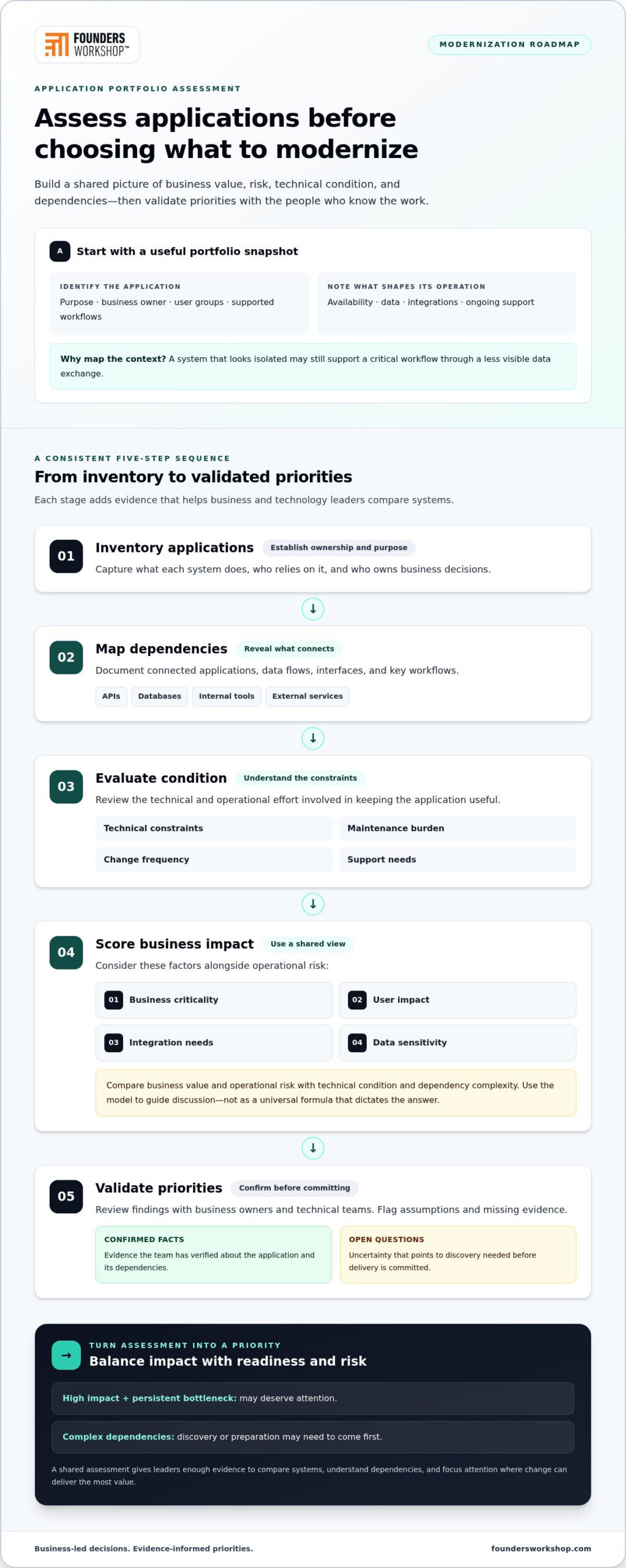
Before choosing a modernization path, build a clear picture of the application portfolio. The goal isn’t to produce a perfect technical inventory. It’s to give business and technology leaders enough shared evidence to compare systems, understand dependencies, and decide where change can deliver the most value.
Which application facts belong in the portfolio assessment?
For each application, record its purpose, business owner, user groups, and the workflows it supports. Note known constraints around availability, data, integrations, and ongoing support. Then map how it connects to APIs, databases, internal tools, and external services. A system that appears isolated may still underpin a critical workflow through a less visible data exchange.
Use a consistent sequence to make the assessment manageable:
- 1. Inventory applications. Capture what each system does, who relies on it, and who owns business decisions.
- 2. Map dependencies. Document connected applications, data flows, interfaces, and key workflows.
- 3. Evaluate condition. Review technical constraints, maintenance burden, change frequency, and support needs.
- 4. Score impact. Consider business criticality, user impact, integration needs, and data sensitivity alongside operational risk.
- 5. Validate priorities. Review findings with business owners and technical teams, and flag assumptions or missing evidence.
Keep confirmed facts separate from open questions. For example, a team may know that a customer workflow depends on a legacy database but not yet know which reports or integrations a change could affect. That uncertainty is useful: it identifies where discovery is needed before committing to delivery. It also helps teams avoid treating assumptions as established dependencies or overlooking less visible users of the system.
How should leaders rank modernization candidates?
Use a shared scoring model to guide discussion, not as a universal formula that dictates the answer. Compare business value and operational risk with technical condition and dependency complexity. A high-impact application that creates a persistent bottleneck may deserve attention, but complicated dependencies could mean discovery or preparation should come first.
Consider a Texas distribution business whose order process relies on several connected systems. If staff repeatedly reconcile conflicting information, leaders can assess the user impact, support effort, integration points, and sensitivity of the data before deciding whether to address the application or a surrounding workflow first. Record why a candidate ranks highly and what evidence would change that priority.
Technology age alone isn’t a sound ranking method. A stable older application may still fit the business, while a newer one may block an important change. IBM’s overview of application modernization strategies describes options such as rehosting and refactoring; portfolio evidence helps leaders determine which options warrant consideration for each system.
A useful enterprise application modernization strategy makes its reasoning visible. Keep the evidence, open questions, and priority rationale together so teams can revisit decisions as business needs or technical understanding changes.
How to Compare Enterprise Application Modernization Strategies
There isn’t one modernization path for every application. A stable system may need little more than continued support, while another may be blocking a critical business change. Compare options against the constraint you need to address, the disruption the business can manage, and the dependencies that must keep working. A full rebuild isn’t the default. Targeted changes can preserve useful workflows while improving specific parts of a system.
| Path | Business fit | Disruption and dependencies | Flexibility and validation |
|---|---|---|---|
| Retain | The application still meets business needs. | Low disruption; keep existing dependencies understood and monitored. | Limited change; validate ongoing performance and support needs. |
| Retire | The application no longer supports a necessary workflow or capability. | Can affect users, data access, and connected systems. | Removes a system; validate data retention, user transition, and dependency impacts. |
| Rehost | The main need is to move the application to a different hosting environment. | Usually preserves much of the application, so existing dependencies remain relevant. | Offers limited application change; validate configuration and expected behavior. |
| Replatform | A platform adjustment can address a defined constraint without a full redesign. | Requires compatibility checks across affected services and integrations. | Creates some room for change; validate platform behavior and connected workflows. |
| Refactor | Improve the application’s internal structure to support ongoing changes. | Can be incremental, though affected components and interfaces need careful testing. | Can improve flexibility; validate existing behavior as components change. |
| Replace | Core business needs can’t be met through proportionate improvements. | Often involves the greatest user, data, and dependency transition effort. | Enables a new application design; validate migration and end-to-end workflows. |
When is incremental modernization the better fit?
Choose a targeted path when a specific component, interface, or workflow is creating friction but the wider application still serves the business. For example, improving an integration may reduce manual handoffs without disturbing a dependable core workflow. Legacy code refactoring can also help when internal structure makes focused changes difficult. Deliver improvements in manageable stages, validating each change before expanding its scope.
When should an application be replaced or retired?
Replacement may fit when the application’s core design can’t support essential business needs through proportionate improvements. Retirement may be appropriate when no necessary workflow depends on it. In either case, plan for user transition, data retention and access, and downstream dependencies before setting a cutover. These impacts may call for a staged transition rather than a single switch.
An enterprise application modernization strategy can sequence different paths across the portfolio. One system might be retained while another is refactored and a third is replaced. Choose the smallest change that addresses the business need, then validate that it works with connected systems and real user workflows.
How to Build a Phased Modernization Roadmap With Manageable Risk
A roadmap turns priorities into controlled delivery. For each application, define the business outcome first, then choose a candidate whose scope and dependencies are understood well enough to plan a safe first release. An enterprise application modernization strategy should leave room to adjust as teams learn, rather than locking every application into a single enterprise-wide timetable.
- Align outcomes. State what should improve and how the team will recognize success.
- Select a candidate. Choose an application or component with a clear business need and a manageable scope.
- Plan dependencies. Identify affected workflows, interfaces, data, and operational constraints.
- Deliver in stages. Test changes in increments, with a defined transition and rollback plan.
- Review results. Compare each release with its success measures, capture issues, and adjust the next phase.
Assign named owners before delivery begins. Business leaders should make scope and priority decisions; architecture owners should address system boundaries and technical dependencies. Delivery leads coordinate implementation, while data and testing owners validate migration and behavior. A communications owner prepares users and support teams for workflow changes. Clear accountability keeps decisions from falling between teams.
How can teams modernize without disrupting daily operations?
Plan around real workflows and periods when interruptions would be especially difficult, such as a busy order-processing cycle or a scheduled business close. Integration testing, data validation, and rehearsed rollback steps help teams understand how a release behaves and what to do if it falls short. Parallel operation can be useful in some cases, but its suitability depends on the application, architecture, and ability to keep data consistent.
Before cutover, confirm that users can complete their key tasks, support teams know how to respond to issues, and communications explain what is changing. Define measures before work starts, such as successful completion of a critical workflow or reduced manual handling. Review those measures after each release, alongside defects and user feedback.
How should a modernization roadmap handle integrations and data?
Map critical data flows and interface dependencies before changing application boundaries. If two connected systems need coordinated updates, sequence their work so they can be validated together. Test both the individual integration and the end-to-end workflow, including how data is created, transferred, and used. Where future analytics or AI capabilities are a business priority, identify the data quality and access needs early, without making them a reason to expand the first release unnecessarily.
A phased plan works best when strategy, design, architecture, and implementation stay connected. Explore modernization delivery with Founders Workshop.
How Founders Workshop Can Help Turn a Modernization Strategy Into Delivery
A strategy creates value when it leads to software changes that support the way the business needs to operate. Founders Workshop is a Dallas-based software development partner serving businesses remotely across the United States. Its managed project teams connect product strategy, UI/UX design, technical architecture, and implementation, carrying business priorities through to delivery.
This matters because modernization decisions affect more than code. A change to an application can reshape staff workflows, customer interactions, and the way systems exchange information. Keeping business stakeholders involved helps teams make practical tradeoffs, clarify what belongs in scope, and align technical decisions with intended outcomes. The leadership team brings over 30 years of experience to this work.
What does a business-led modernization engagement address?
The work begins by translating business priorities and application findings into a delivery direction. If a workflow creates repeated manual effort, for example, the team can clarify the user need, explore design implications, and assess the architecture and integrations involved before defining implementation work. That connection helps prevent a technical change from solving the wrong problem.
As delivery progresses, collaboration with client stakeholders supports decisions about scope, user needs, and technical tradeoffs. Product strategy guides priorities, UI/UX design considers how people interact with the application, and technical architecture addresses how the solution fits with existing systems. Implementation then turns the agreed direction into working software. This provides a practical bridge from an enterprise application modernization strategy to coordinated project work.
What should leaders bring to a modernization consultation?
You don’t need a complete technical blueprint to begin a useful conversation. A concise view of the business goal and the application’s known constraints gives the discussion a clear starting point. It also helps identify where further discovery may be needed before delivery is planned.
- Business goals: Describe what the organization wants to improve, such as a workflow, customer interaction, or ability to make product changes.
- Applications and users: Identify the systems involved, the teams or customers who rely on them, and the workflows they support.
- Known constraints: Share recurring support issues, change limitations, or operational concerns.
- Connections: Note important integrations, data flows, and systems that could be affected by a change.
For businesses in Dallas, Fort Worth, Plano, Frisco, Irving, and elsewhere in Texas, these details can help turn a modernization priority into a practical next step. Contact Founders Workshop for a consultation.
Turn Modernization Priorities Into Practical Progress
A strong enterprise application modernization strategy starts with business outcomes, not a predetermined technology choice. Assess applications by value, risk, condition, and dependencies, then choose a proportionate path for each system. Retaining, refactoring, replacing, or retiring applications can all be right decisions when they support the organization’s needs.
Build momentum through a phased roadmap: assign clear owners, plan integrations and data transitions, validate changes, and measure results after each release. This approach helps teams manage disruption while learning from each stage and refining what comes next.
Founders Workshop brings together product strategy, UI/UX design, technical architecture, and implementation to help turn modernization priorities into delivery. Its Dallas-based team serves businesses remotely across the United States, and its leadership brings over 30 years of experience. You don’t need every technical detail resolved to begin shaping a practical next step.
Contact Founders Workshop for a modernization consultation to plan a roadmap that gives your business room to move forward.
Frequently Asked Questions
What is an enterprise application modernization strategy?
An enterprise application modernization strategy is a business-led plan for improving, replacing, or retiring applications to better support organizational goals. It connects each application decision to business value, operational and technical risk, and future needs. Rather than treating every older system the same way, leaders assess its users, workflows, condition, and dependencies, then choose a proportionate path, from retaining it to making targeted changes or replacing it.
How do you create an application modernization roadmap?
Start by defining the business outcomes, then inventory applications, map dependencies, and assess business impact and technical condition. Select a candidate, plan integration and data work, assign owners, and deliver in stages. Set success measures before implementation and review them after each release. For organizations in Dallas, Fort Worth, Plano, Frisco, and Irving, the roadmap should reflect real operating workflows and the teams that depend on each application.
When should a company modernize a legacy application?
Review an application when it creates sustained business impact, adds growing operational or technical risk, or blocks a strategic change. Recurring workarounds, rising support effort, difficulty scaling, and fragile integrations can all signal a need for assessment. Age alone isn’t enough to justify replacement. If an older system still supports its workflows reliably, retaining it may be reasonable; the decision should follow evidence about business needs and system condition.
What are the main application modernization approaches?
The main approaches are retain, retire, rehost, replatform, refactor, and replace. Retain a system that continues to meet business needs, or retire one that no longer supports a necessary workflow. Rehosting moves an application to a different hosting environment; replatforming changes its platform. Refactoring improves its internal structure, while replacement introduces another application. Choose based on business fit, disruption, dependencies, flexibility, and validation needs.
Does application modernization always require moving to the cloud?
No. Cloud migration is one possible modernization path, not a requirement. A business may get more value from improving a workflow, strengthening an integration, refactoring a component, replacing an application, or retaining a system that still works well. Start with the outcome the organization needs, then compare technical options against that goal. Moving hosting environments without addressing the underlying constraint may leave the business problem unresolved.
How can a company modernize critical applications without disrupting operations?
Reduce disruption by planning around essential workflows, identifying dependencies, and delivering changes in stages. Before cutover, test integrations, validate data, prepare users and support teams, and establish a rollback plan. Parallel operation can help in some situations, but its suitability depends on the application and architecture. For example, a business might validate a new order workflow alongside the existing process before transitioning users, if both systems can operate together reliably.
How do you measure the success of application modernization?
Define measures before delivery that reflect the intended business outcome. Depending on the project, these might track whether users can complete a critical workflow, whether manual steps have been reduced, or whether teams can make planned changes more readily. Also review integration behavior, data accuracy, defects, and user feedback after each release. Compare results with the starting point, then use what the team learns to adjust the next phase.
Contact Founders Workshop for a consultation to discuss your modernization priorities.