

What if the best healthcare technology solution isn’t the newest tool, but the one that removes a daily obstacle for patients and staff? Disconnected systems, manual work, and aging applications can make routine care harder to coordinate. A feature-rich replacement may sound appealing, but technology creates lasting value when it fits real clinical and business needs.
This guide to healthcare technology solutions covers common categories, how to connect them to operational challenges, and how to plan modernization. You’ll find practical considerations for electronic health records, patient-facing platforms, integrations, AI, security, adoption, and legacy systems.
For healthcare leaders in Dallas, Fort Worth, and across Texas, a useful plan starts with the people and processes behind the technology. Dallas-based Founders Workshop develops healthcare technology and modernizes legacy applications, connecting technical work to business priorities. The team also works remotely with organizations nationwide.
Key Takeaways
- Choose healthcare technology solutions to address a defined care or operational need, not for features alone.
- Map each technology option to the people and workflows it is meant to support before setting priorities.
- Assess integration, privacy, migration, and change-management needs to understand the work involved in modernization.
- Define the problem and measures of success, then review results and user feedback after launch.
- Consider how a Dallas-based development partner can align healthcare technology planning with business goals and technical execution.
What healthcare technology solutions cover, and what they are meant to improve
It’s easy to start comparing software before the underlying need is clear. A clinic may be considering a patient portal, an operations team may want to simplify scheduling, and an executive may be weighing whether to replace an aging application. Those are different challenges, even when vendors describe their products in similar terms.
Healthcare technology solutions are digital tools and software systems designed to support patient care, healthcare teams, and the operations that keep an organization running. The category spans systems used directly by patients and clinicians as well as applications for administration and coordination. For a wider overview of the field, see What is Health Technology?
A technology’s name describes its form, not its value. A portal, scheduling application, integration, or custom system is useful only in context: who relies on it, what task it supports, and what friction it should reduce. Start by tracing the workflow from beginning to end. Identify the people, information, handoffs, and systems involved before considering a technology approach.
Which organizations and teams use healthcare technology?
Clinics, health systems, healthcare startups, and operational teams all rely on technology, but their needs differ. Clinical staff may need information during a care workflow. Administrators may focus on coordinating appointments or managing records. Patients may want clearer access to information or routine services, while executives weigh operational priorities, costs, and long-term direction.
Consider a hypothetical provider serving patients across the Dallas-Fort Worth area. If staff re-enter appointment details in separate tools, first map where the information originates, who enters it, and where it is needed next. That can help distinguish an integration need from a process or application issue. The right response depends on how the team works today and where errors, delays, or unnecessary effort occur. Account for staff responsibilities and patient interactions, not just the application’s feature list.
How should leaders define a useful outcome?
Begin with a specific point of friction. Staff may have to search across several places for information or enter the same details more than once. Describe who encounters the problem, when it happens, and what the current process requires. This gives clinical, operational, and technical stakeholders a shared starting point.
Separate the desired outcome from a proposed feature. “We need a new dashboard” names a possible feature. “Staff need a clearer view of the information required to complete a task” describes a need. Keeping those statements distinct makes it easier to compare options without committing too early to a particular tool.
Frame the expected benefit as a goal, not a promise. An organization might aim to reduce duplicate entry, make information easier to locate, or simplify a patient-facing step. Decide how the team will assess progress, such as by tracking a process measure or gathering feedback from the people doing the work. Results depend on implementation, adoption, and fit with existing workflows. This discipline helps leaders judge healthcare technology solutions by their intended contribution, not their novelty.
Healthcare technology solution categories, from patient access to operations
Technology categories are a map, not a shopping list. They help leaders describe the work that needs support, but the right mix depends on how patients and staff move through a specific care or administrative process. One organization may need a clearer patient-facing pathway; another may need better coordination behind the scenes. Some needs involve both.
Choose a healthcare technology solution by starting with the workflow it should improve, then identify the people, information, and tasks it must support. This keeps the discussion grounded in daily work instead of letting a product’s feature set define the problem. The Agency for Healthcare Research and Quality (AHRQ) offers research and resources that can help organizations consider how care processes and technology fit together.
Patient access and engagement tools
Patient-facing tools provide digital ways to interact with a provider or access information. A patient portal, for example, may let people review available information or manage routine interactions. Telehealth supports virtual appointments. These tools address different points in the patient journey, so define the job each one is meant to do: which interaction should it support, and how does it fit with existing care processes?
Convenience is only one consideration. Accessibility matters, as does whether the tool works for the range of patients who may use it. Consider the steps before and after a digital interaction, too. If a virtual visit is part of a broader care process, the surrounding steps still need to be clear to patients and staff.
Clinical, administrative, and data systems
Other categories primarily support staff or organization-wide work:
- Clinical information systems: Electronic health record (EHR) and electronic medical record (EMR) systems are examples of software used in healthcare settings to manage health information and support clinical workflows. The tasks they serve depend on the organization and how its teams work.
- Administrative systems: Scheduling, intake, billing, and other operational tools can help teams coordinate routine work. Their value depends on whether they fit staff responsibilities and existing handoffs.
- Analytics tools: These help teams examine available information to understand patterns, activity, or operational questions. Their usefulness depends on the quality and availability of information and the question leaders are trying to answer.
These categories can overlap. A change aimed at patient access may affect administrative tasks, while a department’s system may depend on information from elsewhere. Distinguish the primary user from the wider workflow: a patient may interact with one tool, but staff and organizational processes shape what happens around it.
For healthcare leaders, these categories are a starting point for defining users, needs, and workflow. Founders Workshop develops healthcare technology and custom software, and can help translate those priorities into a practical technical direction.
Integration, privacy, and legacy systems: the concerns behind healthcare technology decisions
New software can add work if it doesn’t fit existing processes or connect with the systems staff already use. A sound plan weighs what connected tools could make easier against the effort required to move information, manage dependencies, protect sensitive data, and help people adapt.
Why integration affects the day-to-day experience
When systems don’t share information, staff may enter the same details more than once or switch between applications to complete a task. Connecting systems can reduce those handoffs, but an integration should reflect how information is created, used, and maintained. Otherwise, a new connection can introduce extra steps or confusion instead of simplifying the workflow.
An application programming interface, or API, is a way for software systems to communicate and exchange information. Interoperability describes the broader ability of different systems to share and use information consistently. HL7 FHIR is one example of a healthcare data-exchange standard. For an organization, the practical question is how an exchange fits its workflows, data needs, and existing technology, not just whether a connection is technically possible.
Connected systems also create dependencies. A change to one application may affect how another receives or uses information. Before planning an integration, list the systems involved, who relies on the information, and how staff will handle exceptions or interruptions. This makes it easier to assess operational impact alongside potential convenience.
What legacy modernization asks an organization to weigh
An older application doesn’t always need a full replacement. Modernization may mean improving part of an existing system, updating its connections, or replacing it when its limitations make continued use impractical. The right approach depends on the application’s role, condition, and importance to the organization.
Before changing a system, document its dependencies, users, and data. Which teams rely on it? Which other applications use information it holds? Which processes could be affected if the system changed or became temporarily unavailable? The answers help leaders plan the sequence of work and decide what needs to remain available during a transition.
Staff input is essential. People who use an application every day can identify workarounds, hidden handoffs, and important tasks that may not appear in technical documentation. Include those realities in continuity planning, explain changes in practical terms, and make room for training and feedback. Preparation can help an organization respond deliberately if implementation challenges arise.
For a business-focused perspective on modernization, Refactoring Legacy Code: A Guide for Business Growth explores how improving existing software can fit within a broader strategy. Include privacy and security in planning from the outset. Consider what information a system handles, who needs access, how changes are governed, and what processes support ongoing oversight. For a practical checklist on HIPAA-compliant application development, consider how an application handles protected health information, manages access, and fits into your organization’s compliance responsibilities. Treating these as design and organizational questions helps teams make informed choices about healthcare technology solutions without assuming that a particular tool or technical change guarantees a specific result.
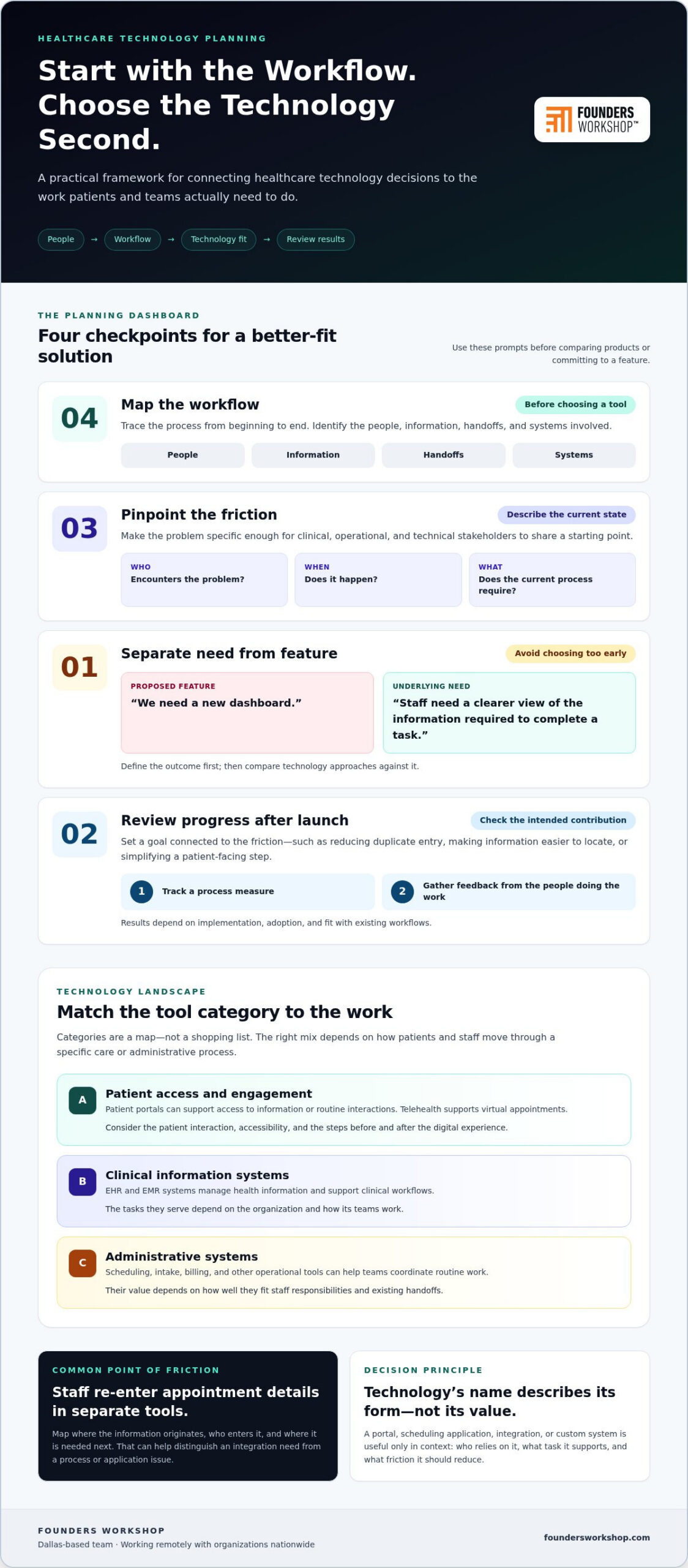
A practical framework for planning healthcare technology improvements
A sound plan starts with the work an organization needs to improve, not with a platform shortlist. Define the workflow problem first. This gives clinical, operational, and technical stakeholders a shared basis for deciding what to change and how to assess whether the change is useful.
Define the need and the people affected
Document the current process from the perspective of the people who use it. Note where work slows down, information is hard to find, or handoffs become confusing. Then describe the intended improvement in plain language. Include patients, clinicians, operations staff, and decision-makers where relevant, since each group may see a different part of the same workflow.
Use this sequence to clarify the case for change:
- Describe the current workflow. Capture the steps, handoffs, systems, and people involved. Make the description specific enough that others can recognize the process.
- Identify the friction. Record where duplicate work, delays, or difficulty accessing information arise. Separate observed problems from assumptions about their causes.
- State the intended improvement. Explain what should become easier or clearer for users without naming a feature or tool as the goal.
- Choose observable indicators. Select a small set of measures to review progress, such as the number of handoffs in a process or staff feedback about a particular task. Establish a baseline where practical, then use the same measures for comparison instead of relying on a generic benchmark.
Involve the people who perform the work, not only those who approve the budget. Their input can reveal exceptions and informal steps that a process diagram might miss. It can also help leaders distinguish a system limitation from a training, communication, or workflow issue.
Plan scope, delivery, and ongoing learning
Before settling on a delivery plan, map the constraints around the change. Consider the systems it may need to connect with, the data involved, the people who will use it, and the tasks that must continue during transition. Scope, stakeholders, data, and existing systems all shape the effort. Capture dependencies early so the team can discuss sequencing and support needs realistically.
A focused first release can make learning more manageable. Rather than changing every related process at once, select a well-defined part of the workflow and review it with its intended users. This is not a shortcut around planning. It clarifies scope, surfaces practical questions, and informs what should happen next. For general scope planning, Building a Minimum Viable Product on a Budget: The 2026 Founder’s Guide offers a related perspective.
After launch, compare results with the goals and indicators set earlier. Gather feedback from affected users, note unexpected effects, and decide whether to adjust, extend, or pause the work. Make that review part of the plan. If your organization is defining a healthcare technology roadmap, talk with Founders Workshop about planning your next step.
How Founders Workshop approaches healthcare technology solutions
A healthcare technology project connects business priorities with the work people need to do. The goal isn’t to add software for its own sake. It’s to understand the challenge, define what needs to change, and choose a path that fits the organization’s people, processes, and technical environment.
Founders Workshop is a software development agency based in Dallas, Texas, serving clients remotely across the United States. Its work includes healthcare technology development, custom software, system integrations, and legacy application modernization. The right combination depends on the organization’s needs and the role technology is expected to play.
Align software decisions with people and business goals
Start with the people closest to the challenge. A clinician, administrator, patient, and executive may each experience the same process differently. Listening to those perspectives helps clarify what the software needs to support and where a change could affect existing responsibilities. This human-centered discovery gives the project a practical foundation instead of assuming a new feature will resolve the problem.
The leadership team brings more than 30 years of experience to technology work. That experience informs an approach grounded in business context, current systems, and practical constraints. A custom application may suit a distinct workflow; integration may help systems exchange information; modernization may be appropriate when an existing application creates barriers to change. These are different paths, not automatic recommendations.
AI can be considered when a defined use case makes it relevant to the organization’s goals and workflow. Ask what task it is intended to support, how people would use its output, and what considerations should guide its use. For broader guidance on evaluating potential applications, see AI Strategy Consulting: A 2026 Guide to ROI-Driven Implementation.
Move from an identified challenge to a considered next step
Start with a clear description of the workflow problem: who encounters it, what happens today, and what the organization hopes to improve. Discovery can then examine the systems, information, dependencies, and users involved. That understanding connects an operational need to technical planning, whether the work calls for new software, changes to an existing application, or a focused integration.
Scope should reflect the organization, not a preset package. Priorities, existing technology, available information, and the people affected all shape what makes sense to address first. A defined first phase can focus on a specific need while leaving room to learn and adapt as the work progresses. The aim is a plan clear enough to guide decisions and flexible enough to account for what discovery reveals.
For healthcare organizations in Dallas-Fort Worth, elsewhere in Texas, or across the country, Founders Workshop brings business goals, people, and technical execution into the same conversation. That alignment helps leaders consider practical next steps without assuming one solution fits every organization.
Make your next technology decision a deliberate one
The next step doesn’t have to be a major system overhaul. Choose one workflow that deserves attention, involve the people who understand it, and clarify what a more workable process would look like. That gives your organization a practical starting point for evaluating healthcare technology solutions in context, with room to account for operational priorities and the experience of patients and staff.
Build decisions on what your team learns. A well-defined need helps focus discovery, shape an appropriate scope, and keep technical choices connected to the work they’re meant to support. Progress comes from thoughtful choices, not adopting every new capability at once.
If you’re ready to discuss a healthcare technology challenge or opportunity, contact Founders Workshop for a consultation.
Frequently Asked Questions
Are healthcare technology solutions only for hospitals?
No. Clinics, specialty practices, healthcare startups, and administrative teams can all use software to support specific needs. A small practice might examine how appointment reminders fit into its front-desk process, while a startup may need software for a new care-related service. The right scale depends on the organization and its workflows, whether it operates in Dallas-Fort Worth or elsewhere.
Can healthcare technology help a small clinic improve daily operations?
Yes, when the project addresses a specific operational bottleneck. A clinic might examine how staff handle appointment requests, route incoming forms, or prepare information before a visit. Map who performs each step to see whether the issue calls for a process adjustment, a software change, or both. Start with one recurring task and define what the team wants to make easier before expanding the scope.
What is the difference between an EHR and an EMR?
The terms are related and are sometimes used differently by vendors and healthcare organizations. Generally, an electronic medical record (EMR) refers to a digital record used within a practice, while an electronic health record (EHR) is often intended to support a broader view of health information across care settings. In practice, compare what a particular system does, what information it manages, and how it fits the organization’s workflows.
How can healthcare organizations approach legacy software?
Understand the application’s role before deciding whether to maintain, improve, or replace it. Talk with the people who use it, document important tasks, and identify other systems that rely on its data or functions. A scheduling application, for instance, may support processes beyond appointment booking. This inventory helps leaders see what a proposed change could affect and plan priorities around operational needs.
How should healthcare leaders think about privacy when planning software?
Build privacy considerations into early planning rather than treating them as a final review. Identify the types of information involved, the people and roles that need access, and how information moves between systems. Clarify who will make decisions about access and changes over time. These questions help teams include privacy in design and governance discussions; they don’t replace organization-specific legal or compliance guidance.
Can artificial intelligence be part of healthcare technology solutions?
Yes, when there’s a defined use case and a clear reason to consider it. A team might explore whether AI could assist with a well-bounded administrative task, then evaluate how staff would review and use its output. Consider the information involved, potential limitations, and impact on existing work before moving forward. The aim is to assess fit and value, not add AI simply because it’s available.
What should a healthcare organization do before starting a software project?
Write a concise project brief that identifies the affected users, the process in question, the current difficulty, and the change the organization hopes to explore. Note known systems, information dependencies, and constraints, then invite feedback from staff who perform the work. A Dallas or Fort Worth provider might also account for how a workflow differs across clinic locations. This preparation makes early planning conversations more focused.
Ready to discuss your healthcare technology needs? Contact Founders Workshop for a consultation.