Introduction
Software development is changing faster than most teams can track. AI tools have moved well past being a convenience — they're now embedded in requirements gathering, code generation, testing, and deployment. Yet most organizations are still using AI the way they'd use a spell-checker: one developer, one task, one shortcut at a time.
Most teams have AI tools. Few have an AI-first process — and that's where real speed and cost advantages get lost.
According to Stack Overflow's 2025 Developer Survey, 84% of developers are using or planning to use AI tools, but adoption at the organizational level is far lower. Many teams have AI, but few have an AI-first process.
This guide covers:
- What AI-first software development actually means in practice
- The core principles that separate structured approaches from hype
- Best practices that determine whether AI makes your project faster or just messier
- How to assess whether it's the right model for your work
Key Takeaways
- AI-first development embeds AI across the full delivery lifecycle, from planning through deployment
- Human oversight remains non-negotiable: AI generates, humans validate
- Structured specifications and good documentation are the foundation of every AI-first project
- AI-first works best for apps, APIs, dashboards, MVPs, and internal tools with stable requirements
- Poor inputs produce poor AI outputs, and those errors compound fast at scale
What AI-First Software Development Really Means
The Definition
AI-first software development is an approach where AI is built into the software delivery lifecycle by design — not bolted on as a productivity tool for individual developers. The goal is to systematically automate repeatable engineering work while keeping humans in control of architecture, business logic, security, and quality decisions.
This is different from AI-assisted development, where individual developers use tools like GitHub Copilot or ChatGPT to code faster. AI-assisted means faster individuals. AI-first means a different delivery model altogether.
The distinction matters because only 30–40% of organizations actively encourage and promote AI adoption even as individual usage is high — meaning most teams are getting fragmented benefit rather than structural advantage.
What It Actually Includes
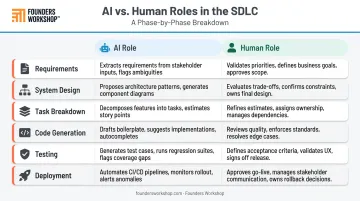
In a mature AI-first model, AI functions as an execution layer, not a decision-maker. Here's how that plays out across the full SDLC:
| Phase | AI Role | Human Role |
|---|---|---|
| Requirements | Synthesize and structure inputs | Define business goals and priorities |
| System Design | Suggest architecture patterns | Own architectural decisions |
| Task Breakdown | Generate work items and dependencies | Validate scope and sequence |
| Code Generation | Produce first-draft implementations | Review for correctness and security |
| Testing | Write and run automated tests | Define coverage requirements |
| Deployment | Automate build and release steps | Approve and monitor releases |
Why It Matters for Founders and SMBs
For a founder who can't afford a $300K+ engineering team, AI-first delivery compresses cost and timeline in ways that weren't possible even three years ago. Faster time-to-market, lower cost-per-feature, and the ability to compete with larger teams — without giving up equity to a technical co-founder. Done right, it's a structural advantage, not just a productivity boost.
Core Principles of AI-First Development
Think Like a Manager, Not a Coder
The role shift from writing code to directing, reviewing, and validating AI output is the central challenge of AI-first development. Domain knowledge and product judgment become more valuable than syntax expertise. If you can explain clearly what needs to be built and why, you can direct an AI agent effectively.
Structured Specifications Are the Source of Truth
AI-first projects must start with stable, well-documented requirements before code generation begins. Converting designs and requirements into structured specifications — with clear module boundaries, API contracts, and documented assumptions — is what makes AI output deterministic and reviewable.
At Founders Workshop, this is what the Definition phase of the 5D Process is designed to produce: an actionable roadmap with detailed product specifications before a line of code is written.
Invest in Your Rules and Documentation Infrastructure
One of the most underused practices in AI-first development is the rules file — a document like AGENTS.md or CLAUDE.md that gives AI agents persistent context about your project's architecture, coding standards, preferred libraries, and constraints.
OpenAI Codex reads AGENTS.md before work begins, layering global guidance with project-specific overrides. Anthropic recommends keeping CLAUDE.md under 200 lines: concise and concrete, not exhaustive.
The payoff is significant. In AI-first development, good documentation doesn't just help humans orient themselves — it shapes every output the AI produces.
Human Review Is Required at Every Step
AI agents make mistakes, and the subtle ones are the dangerous kind — they pass superficial review and surface later as production bugs. Every piece of production code requires human review. The principle: AI generates, humans validate.
Thoughtworks recommends explicit review gates where generated work is broken into small milestones and nothing is integrated without human approval. Security controls, business logic, edge cases, and integration work all require explicit human checkpoints.
Fix the System, Not the Symptom
When AI produces wrong output repeatedly, patching individual issues is the wrong response. The right response is improving the inputs: better documentation, clearer specs, stronger architectural guidelines.
Teams that treat repeated AI failures as a process signal — rather than a one-off fix — end up with documentation and specs that compound in value. The workarounds never do.
AI-First Development Best Practices
Choose AI-Friendly Architecture
Architecture choices directly affect how well AI agents can work. Practical guidance:
- Use popular, well-documented languages and frameworks with abundant training data
- Favor monorepo setups over complex microservice architectures in early stages
- Prefer standard patterns over unusual or custom stacks
- Use descriptive, well-named files and variables — these help AI agents orient themselves
The same friction that slows human developers compounds quickly when AI agents are involved.
Use a Planning-First Workflow for Every Major Feature
Before generating any code, write a planning document that outlines stages, dependencies, and expected outputs. This creates:
- Alignment between human and AI on what needs to be built
- A checkpoint for review before each stage begins
- Recoverable context that can be referenced throughout the project
OpenAI Codex best practices recommend planning first for difficult tasks, with explicit goals, constraints, target files, and clear "done when" criteria.
Founders Workshop's 5D Process — Discovery, Definition, Development, Deployment, and Dedicated Support — is built around this planning-first discipline. The Definition phase alone (4–6 weeks) produces the structured specifications that make AI-first development reliable rather than unpredictable.
Manage Context Aggressively
AI models become less effective as context windows grow large or get polluted with irrelevant information. Anthropic describes context pollution as a core risk for long-running agent tasks. Key practices:
- Keep conversations focused on specific tasks
- Compact or clear context regularly — don't let sessions accumulate noise
- Store key decisions in persistent documentation, not conversation memory
- If an agent fails to fix an issue after two attempts, start fresh with a more specific prompt
Your CLAUDE.md or AGENTS.md file gets re-injected after compaction — which is why investing in that file saves significant rework as the project grows.
Use Multiple Models Strategically
Different AI models have different strengths. Some excel at creative planning and writing; others at debugging and critique. A few principles worth building into your workflow:
- Switch models when you're stuck rather than troubleshooting indefinitely with one tool
- Use one model to critique the output of another, especially for planning documents and code review
- Match the model to the task rather than defaulting to a single tool for everything
Invest in Automated Testing — Set Up Correctly
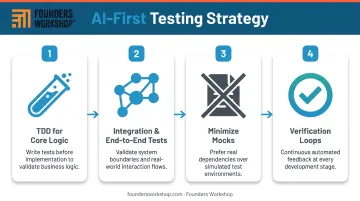
Once your models and workflow are in place, testing becomes the last line of defense — specifically against AI-introduced regressions. A practical setup:
- Start with TDD for core logic — define tests before generating code
- Consolidate into integration or end-to-end tests for regression catching across modules
- Minimize mocks in favor of real interactions where possible
- Use tests as verification loops — agents are most effective when they can confirm their work passes before handing off
The goal isn't just validating the initial build. It's catching the subtle breakages that confident AI code can introduce.
The Evolving Role of Human Engineers
In AI-first teams, human developers are taking on a more strategic role, not a diminished one. McKinsey reports that AI-enabled SDLC adoption is shifting the labor pyramid toward senior engineers who can review AI-generated code and manage complex architectures. Gartner predicts that by 2027, 70% of software engineering leader role descriptions will explicitly require generative AI oversight, up from less than 40% today.
The skills that matter most in this environment:
- Writing effective prompts and structured specifications
- Evaluating AI-generated code for correctness and security vulnerabilities
- Architecting systems for AI-friendliness
- Recognizing when AI output is plausible but wrong
That last skill is the hardest to develop and the most important. AI produces code that looks correct and compiles cleanly — but logic errors and security gaps don't always surface until review.
The Collaboration Dynamic
The division of work in a well-run AI-first team:
AI handles:
- Scaffolding, boilerplate, and repetitive patterns
- First-draft implementations
- Test generation
Humans handle:
- Integration work and complex business logic
- Security-sensitive code
- Architecture decisions and final review
For founders and SMBs working with an external development partner, this division of responsibility is what makes AI-first development practical at scale. Founders Workshop applies this model directly: U.S.-based business analysts and project leads oversee AI-augmented nearshore development teams, giving clients faster execution without giving up visibility or control.
Managing Risk and Code Quality in AI-First Development
The Garbage-In, Garbage-Out Problem
AI amplifies whatever quality it starts with. Well-structured, modular code with clear documentation makes AI significantly more effective. Poor codebases cause quality to degrade rapidly — and at scale.
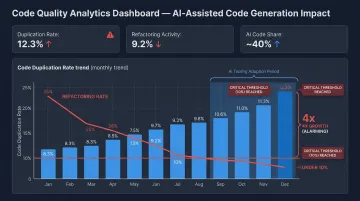
The data supports this concern. GitClear analyzed 211 million changed lines of code and found 4x growth in code clones, with copy-pasted code rising from 8.3% to 12.3% and refactoring-related changes falling from 25% in 2021 to less than 10% by 2024. AI is generating more code — but not always better code.
Security and Data Protection
Sensitive business data, credentials, and production access should never be exposed to external AI services. The Samsung data leak in 2023 (where employees entered proprietary source code into ChatGPT) illustrates the real risk. Samsung subsequently banned generative AI tools across company devices and internal networks.
Practical guidelines:
- Define explicitly what data AI agents can and cannot access
- Keep AI operating on anonymized, generic context rather than raw production code
- Treat AI service data transmission with the same sensitivity as third-party API access
The Vigilance Requirement
The same risks that make data protection non-negotiable apply to every line of AI-generated code. Review AI output the way you'd review code from a capable but overconfident junior developer — that framing keeps the right level of scrutiny in place.
Each planning stage should end with a human review and a test-passing checkpoint before proceeding. That gate catches compounding errors early, when they're cheap to fix rather than expensive to unwind.
Is AI-First Development Right for Your Project?
Where It Delivers the Highest Value
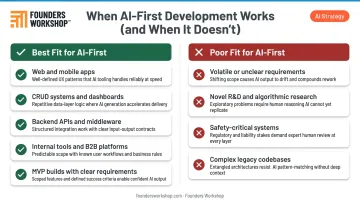
AI-first development performs best on projects with stable, well-defined requirements and repeatable engineering patterns. Strong candidates include:
- Mobile and software applications
- CRUD systems and dashboards
- Backend APIs and middleware
- Internal tools and B2B platforms
- MVP builds with clear product requirements
McKinsey's study of 40+ developers found up to 2x speed improvement on selected coding tasks — documentation, new code generation, and refactoring showed the strongest gains.
Where It's a Poor Fit
The approach has real limits. AI-first development is a poor match for:
- Projects with volatile or unclear requirements
- Novel algorithmic research or experimental R&D
- Systems requiring near-zero error tolerance (certain medical devices, safety-critical infrastructure)
- Mature, large codebases with high implicit requirements — METR's 2025 study found experienced developers were actually 19% slower on complex real-world open-source issues with early-2025 AI tools
Forcing AI-first delivery onto these project types produces frustration and risk — without the speed gains that justify the investment.
How to Evaluate Readiness
Once you've identified potential risk areas, these three questions help clarify whether your project is a good fit:
- Are your requirements stable enough to support structured specifications before development begins?
- Which modules are AI-friendly (repeatable, well-defined) versus which require classical engineering depth?
- Do you have the workflow and tooling in place, or would you benefit from working with a partner who has already built it?
Founders Workshop's Discovery phase addresses exactly this: scoping the most valuable features, evaluating technical fit, and establishing the structured foundation that AI-first delivery depends on.
Frequently Asked Questions
What is the difference between AI-first and AI-assisted software development?
AI-assisted means individual developers use AI tools like Copilot to code faster. AI-first means AI is embedded into the full delivery lifecycle by design — with structured specifications, agent-based code generation, and systematic human review at every stage. The difference is organizational, not just individual.
Does AI-first development mean you no longer need human developers?
No. Humans remain essential — not for writing every line of code, but for architecture decisions, business logic, security, quality control, and final review. AI generates; humans validate and own the output.
What types of software projects benefit most from an AI-first approach?
Applications, APIs, dashboards, internal tools, and MVP builds with defined requirements are the strongest fit — particularly where speed-to-market and cost efficiency are priorities. Projects with stable, well-documented requirements see the clearest gains.
How does AI-first development affect code quality and security?
AI amplifies whatever quality it starts with — good architecture and clear specs produce better results, while poor inputs lead to compounding quality problems. Security requires that sensitive data, credentials, and proprietary code never be passed to external AI services.
How much faster is AI-first development compared to traditional methods?
McKinsey's study found up to 2x faster completion on selected tasks, with the strongest gains on documentation, new code, and refactoring. Gains dropped below 10% for highly complex tasks. Well-scoped projects using structured AI-first delivery consistently see significant time and cost reductions.
What skills do developers need to thrive in an AI-first environment?
Prompt engineering, specification writing, AI output review, and architecture design for AI-friendliness are the core technical skills. Deep domain knowledge and business context become more valuable, not less. Knowing when AI output is wrong — and why — is what no tool can replace.