Introduction
Mobile internet users hit 4.7 billion by end of 2023, according to GSMA Intelligence — and consumer spending on mobile apps reached $150 billion in 2024 across iOS and Google Play. For founders and SMBs, those numbers represent both the opportunity and the pressure to move.
Most businesses, though, don't have the in-house capacity to build one well. Recruiting a development team takes 3–6 months in a competitive job market, and maintaining it runs $750,000 to $1 million annually — before accounting for API integrations, compliance requirements, or cross-platform complexity.
This guide gives you a clear path from idea to launch. You'll walk away knowing:
- The main types of mobile apps and which fits your goals
- The 7 development stages and what happens at each
- How frontend and backend architecture work together
- What to look for — and watch out for — in a development partner
Key Takeaways
- Mobile app development services span discovery, UX design, frontend/backend engineering, QA, deployment, and post-launch maintenance — not just coding.
- Native, web/PWA, hybrid, and cross-platform apps each suit different goals and budgets.
- A structured 7-stage process keeps projects on schedule and on budget.
- Frontend is what users see; backend is what makes it all run — and both require equal attention.
- Vet partners on process and past work — technical skills alone don't predict delivery.
What Mobile App Development Services Actually Include
Most founders underestimate what building a mobile app actually involves. Writing code is maybe 40% of it.
A full-service mobile app engagement covers:
- Discovery and strategy — scoping features, defining user needs, competitive landscape
- UX research and design — wireframes, user flows, clickable prototypes
- Frontend development — the interfaces and interactions users see
- Backend development — databases, APIs, authentication, business logic
- QA testing — functional, integration, performance, and usability testing
- Deployment — app store submission and launch
- Post-launch support — bug fixes, OS updates, feature iterations, performance monitoring
B2C vs. B2B Apps: Different Priorities
The service requirements shift depending on what you're building.
Consumer-facing apps (B2C) demand heavy investment in UX design, onboarding flows, and retention mechanics. Users delete without mercy — research from Airship found 57% of consumers use an app only once or twice before deciding whether to keep it.
Internal business tools (B2B) prioritize integrations, data security, role-based access, and workflow logic over visual polish. The user base is captive, but the functional requirements are often more complex.
Why Most SMBs Outsource
Building in-house is the exception, not the rule. According to Deloitte's Global Outsourcing Survey, 62% of executives use managed services specifically to keep pace with technology change — not just to cut costs. The data backs that up: 57% cite cost reduction as a driver, and 50% flag talent acquisition as a top internal challenge.
For founders, outsourcing sidesteps two costly problems at once: equity dilution from technical co-founders and the 3–6 month hiring lag that stalls in-house team builds before a line of code is written.
Types of Mobile App Development: Which Approach Fits Your Business?
Choosing the wrong app type early is an expensive mistake — one that shows up in your budget, your timeline, and your user experience. Here's a breakdown of each approach and when it makes sense.
Native Apps
Built exclusively for one operating system — iOS (Swift) or Android (Kotlin). Native apps offer the best performance, full access to device hardware (camera, GPS, biometrics, AR), and the smoothest user experience.
The trade-off: you're maintaining two separate codebases. That means roughly double the development cost and timeline for multi-platform reach.
Best for: Apps where performance is the product — gaming, AR, real-time streaming, or deep OS integrations.
Web Apps and PWAs
Progressive Web Apps (PWAs) run in the browser, require no download, and are built with HTML, CSS, and JavaScript. The HTTP Archive Web Almanac reports that 24.5% of websites use at least one PWA feature.
They work well when reach matters more than device-specific performance. No app store approval, instant updates, and accessible on any device.
Best for: Content-heavy platforms, internal tools accessible via desktop and mobile, or situations where download friction is a real barrier.
Hybrid Apps
A app wrapped in a native shell that can access device features via APIs. One codebase, lower cost, but performance inconsistencies can appear without careful build management.
Ideal when: You have a constrained budget but need some native functionality without the full investment of native development.
Cross-Platform Development
Frameworks like React Native and Flutter let developers write one codebase that runs on both iOS and Android with near-native performance. According to JetBrains' 2023 Developer Survey, almost half of mobile developers use cross-platform technologies — with Flutter at 46% and React Native at 32% among cross-platform frameworks.
Cross-platform development can reduce initial costs by 20–40% compared to building separate native apps, according to GoodFirms data from 267 mobile development companies.
Use this when: You're building a startup MVP or SMB app where speed to market and cost efficiency matter. Cross-platform is the starting point for most MVP engagements — it delivers near-native results without doubling your budget.
Quick Decision Framework
Not sure which approach fits your project? Match your situation to the right starting point:
| Situation | Recommended Approach |
|---|---|
| Validating an MVP on limited budget | Cross-platform (React Native or Flutter) |
| App with deep hardware dependencies (AR, biometrics) | Native |
| Broadest possible reach, no download required | PWA |
| Single codebase, some device access needed | Hybrid |
| Two separate, performance-critical OS experiences | Native (both) |
The 7 Stages of Mobile App Development
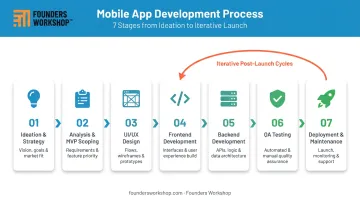
A structured process is what separates apps that ship from apps that stall. Here's how a well-run engagement unfolds.
Stages 1–2: Strategy, Planning, and MVP Definition
Stage 1 — Ideation and strategy: Before writing a line of code, define the app's purpose, target user, competitive landscape, and core value proposition. Skipping this phase is among the most common reasons apps fail to find users post-launch.
Stage 2 — Analysis, planning, and MVP scoping: Translate the idea into a project roadmap — requirements, milestones, technology stack, and a clearly bounded Minimum Viable Product. Defining MVP scope early prevents scope creep, which PMI research links to 40% of projects in organizations that underinvest in planning disciplines.
At Founders Workshop, these two stages map to the Discovery (D1) and Definition (D2) phases of their 5D Process. Discovery takes 2–4 weeks and produces a scoped feature set with a budget plan. Definition adds 4–6 weeks and delivers a clickable prototype clients can test with investors or early users before development begins.
Stage 3: UI/UX Design
Wireframes, user flows, and prototypes come before development — not after. This matters for one practical reason: design changes made on paper cost a fraction of what they cost once a feature is built.
UX quality also drives retention directly. Apps that nail navigation and flow at this stage see significantly fewer users drop off after the first session — making design investment one of the highest-ROI decisions in the entire project.
Stages 4–5: Development and Testing
Frontend and backend development run in parallel, with QA woven throughout — not bolted on at the end.
Testing categories to expect from a serious partner:
- Functional testing — does each feature work as specified?
- Integration testing — do all components communicate correctly?
- Performance testing — how does the app behave under load?
- Security testing — are user data and authentication properly protected?
- Usability testing — does the interface behave as users expect?
Catching issues during development costs a fraction of what they cost post-launch — making iterative QA one of the clearest ways to protect your budget.
Stages 6–7: Deployment and Post-Launch Maintenance
Deployment includes app store submission. Apple states 90% of App Store submissions are reviewed in under 24 hours. Google Play requires completion of App Content declarations before review — factor both into your launch timeline.
Post-launch maintenance is where most teams underestimate cost. GoodFirms research puts annual maintenance and support at 15–25% of total project budget, with some benchmarks recommending 20–30% of the original build cost per year. Successful apps spend as much on post-launch iteration as on initial development.
Founders Workshop's D5 Dedicated Support phase covers monitoring, bug fixes, performance optimization, feature updates, and code reviews — billed separately from the build, starting at $625/month.
Frontend vs. Backend in Mobile App Development
Even if you're not writing the code yourself, understanding this distinction changes how you evaluate timelines, vendors, and cost breakdowns.
Frontend: What Users See
The frontend is everything visible and interactive — screens, buttons, navigation, animations, and transitions. Frontend developers focus on responsiveness, visual design, and the quality of the user experience.
Common mobile frontend technologies:
- React Native — cross-platform, JavaScript-based
- Flutter — cross-platform, Dart-based
- Swift — native iOS
- Kotlin — native Android
Backend: What Makes It Work
Think of the frontend as a restaurant's dining room and the backend as the kitchen. Guests see plates arriving; they don't see the prep, the storage, or the logistics behind it.
That same division applies to your app. Every mobile app backend has three core components:
- A server that processes requests from the app
- A database that stores and retrieves user data
- APIs that connect the frontend to backend systems and external services — payments, notifications, maps, authentication
For founders working with a development partner, the backend scope directly determines integration complexity, data architecture decisions, and long-term maintenance costs.
BaaS vs. Custom Backend
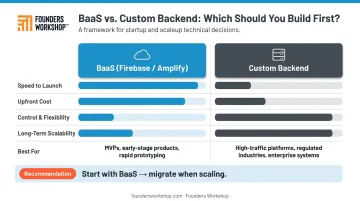
For early-stage startups, Backend as a Service (BaaS) platforms like Firebase (Google) and AWS Amplify provide pre-built infrastructure — authentication, real-time databases, push notifications — faster and cheaper than custom development.
| Factor | BaaS (Firebase/Amplify) | Custom Backend |
|---|---|---|
| Speed to launch | Faster | Slower |
| Upfront cost | Lower | Higher |
| Control and flexibility | Limited | Full |
| Long-term scalability | Platform-dependent | Unlimited |
| Best for | MVPs and early-stage apps | Complex, scaling products |
BaaS trades long-term flexibility for speed and lower upfront cost. If you're still validating whether the market wants your product, start with BaaS. Once you're scaling — or when your data requirements outgrow the platform — migrate to a custom backend built around your specific business logic.
How to Choose a Mobile App Development Partner
The idea matters less than the execution. And execution depends almost entirely on who builds it.
What to Evaluate
- Proven process — a repeatable development framework signals accountability and reduces risk
- Relevant portfolio — have they built in your industry or app category?
- Transparent pricing — fixed scope or clear time-and-materials terms, not vague estimates
- Post-launch support — what happens after launch? Who owns bugs and updates?
- Code ownership — you should own all source code from day one
Cost Considerations
App development costs vary widely. GoodFirms data from 267 mobile development companies puts typical ranges at:
- Simple apps: $15,000–$40,000
- Mid-level apps: $40,000–$120,000
- Advanced apps: $100,000–$250,000+
Founders Workshop's fully managed projects typically run $80,000–$350,000 for a 3–6 month engagement, with some projects starting around $25,000 for narrowly scoped MVPs.
Nearshore development is where significant cost savings come in. Founders Workshop pairs U.S.-based business analysts with nearshore Latin American developers who work in the same time zones, speak the same language, and cost roughly one-third of equivalent U.S.-based rates.
For context, building a comparable in-house U.S. team runs $750,000–$1 million annually — before equity dilution.
Red Flags and Right Questions
Before signing with any development partner, ask:
- What is your development process, step by step?
- Can I see examples of apps you've built in my category?
- Who owns the source code and IP?
- How do you handle scope changes mid-project?
- What does post-launch support look like, and how is it priced?
The answers reveal a lot. A structured, repeatable process like Founders Workshop's field-tested 5D Process is a strong signal of accountability. Ad-hoc vendors who skip discovery and jump straight to development are where budgets go missing and timelines collapse.
Frequently Asked Questions
What are the 7 stages of app development?
The seven stages are: ideation and strategy, analysis and planning, UI/UX design, frontend development, backend development, QA testing, and deployment with ongoing maintenance. In practice, development and testing overlap, running in parallel rather than sequentially.
What is frontend and backend in app development?
Frontend is the user-facing interface — screens, buttons, navigation, and animations. Backend is the server-side infrastructure that handles data storage, processing, authentication, and business logic. Both must work together for the app to function.
What are the 4 pillars of Android development?
Android's four core app components are:
- Activities — individual screens users interact with
- Services — background processes that run without a UI
- Broadcast Receivers — listeners for system-wide events like connectivity changes
- Content Providers — managers of shared app data across the system
How much does it cost to develop a mobile app?
Costs range from roughly $15,000 for a simple MVP to $250,000+ for advanced apps with custom backends, per GoodFirms benchmarks across 267 development companies. Nearshore development can reduce costs by roughly two-thirds compared to fully U.S.-based teams.
How long does mobile app development take?
A simple MVP typically takes 3–6 months. Complex apps with custom backends run 9–12+ months. Vague requirements at the start are the single most common cause of delays — a clearly defined scope upfront is the best way to protect your timeline.
Should I build a native or cross-platform mobile app?
Cross-platform (React Native or Flutter) is the right default for most startups and SMBs — faster timelines, lower costs, and near-native performance on both iOS and Android. Native development makes sense when your app depends on deep OS integration, maximum performance, or hardware features like advanced AR or biometric processing.